


타입스크립트 애플리케이션에서 LocalStack 테스트 컨테이너 사용하기
RECOMMEND POSTS BEFORE THIS
0. 들어가면서
신뢰할 수 있는 테스트(reliable test)를 작성하려면 실제 환경과 유사한 환경에서 테스트를 구축할 필요가 있다. 도커 컨테이너가 등장한 이후로 로컬에서 운영 환경과 유사한 환경을 구축하기 쉬워졌고, 테스트 환경도 테스트 컨테이너(test container)를 통해 보다 쉽게 결합 테스트(integration test)가 가능해졌다.
여태껏 스프링 애플리케이션에서만 테스트 컨테이너를 사용했었는데, 최근 참여한 프로젝트는 스프링을 사용하지 않았기에 다른 환경에서 테스트 컨테이너를 사용하게 되었다. 이번 글은 타입스크립트 애플리케이션에서 테스트 컨테이너와 LocalStack 컨테이너를 통해 AWS 컴포넌트들과 결합 테스트를 수행하는 방법에 대해 정리했다.
현재 참여하게 된 팀은 서버리스 아키텍처를 채택하고 있었고, 백엔드 애플리케이션으로 AWS 람다(lambda)를 사용하고 있다. 람다 핸들러에서 DynamoDB와 S3 스토리지를 사용하는 경우 이에 대한 결합 테스트가 필요했다. 내가 팀에 참여하기 전까진 테스트 더블(test double)을 통한 단위 테스트가 작성되어 있었지만, 이 경우 단위 테스트는 신뢰도가 굉장히 떨어진다. 테스트 컨테이너를 사용한 결합 테스트로 리팩토링을 수행했다.
테스트 컨테이너를 사용할 때 어떤 컨테이너 이미지를 사용할지 결정해야 한다. S3 스토리지는 minio/minio, DynamoDB는 dynamodb-local 컨테이너를 사용할 수 있지만, LocalStack 컨테이너를 사용하면 모두 커버할 수 있어서 이를 사용했다.
1. Client modules
다음과 같은 의존성들이 필요하다. AWS 리소스를 사용하기 위한 모듈들이다.
$ npm install @aws-sdk/client-dynamodb @aws-sdk/client-s3 @aws-sdk/lib-dynamodb
Node 런타임에서 타입스크립트로 개발하므로 다음과 같은 의존성도 필요하다.
$ npm install -D typescript @types/node
테스트 코드에서 테스트 컨테이너를 사용하려면 DynamoDB 클라이언트나 S3 클라이언트의 접속 정보를 테스트 컨테이너로 변경해야 한다. 런타임과 테스트 런타임에 서로 다른 접속 정보를 사용해야 하기 때문에 각 클라이언트를 위한 모듈을 만든다.
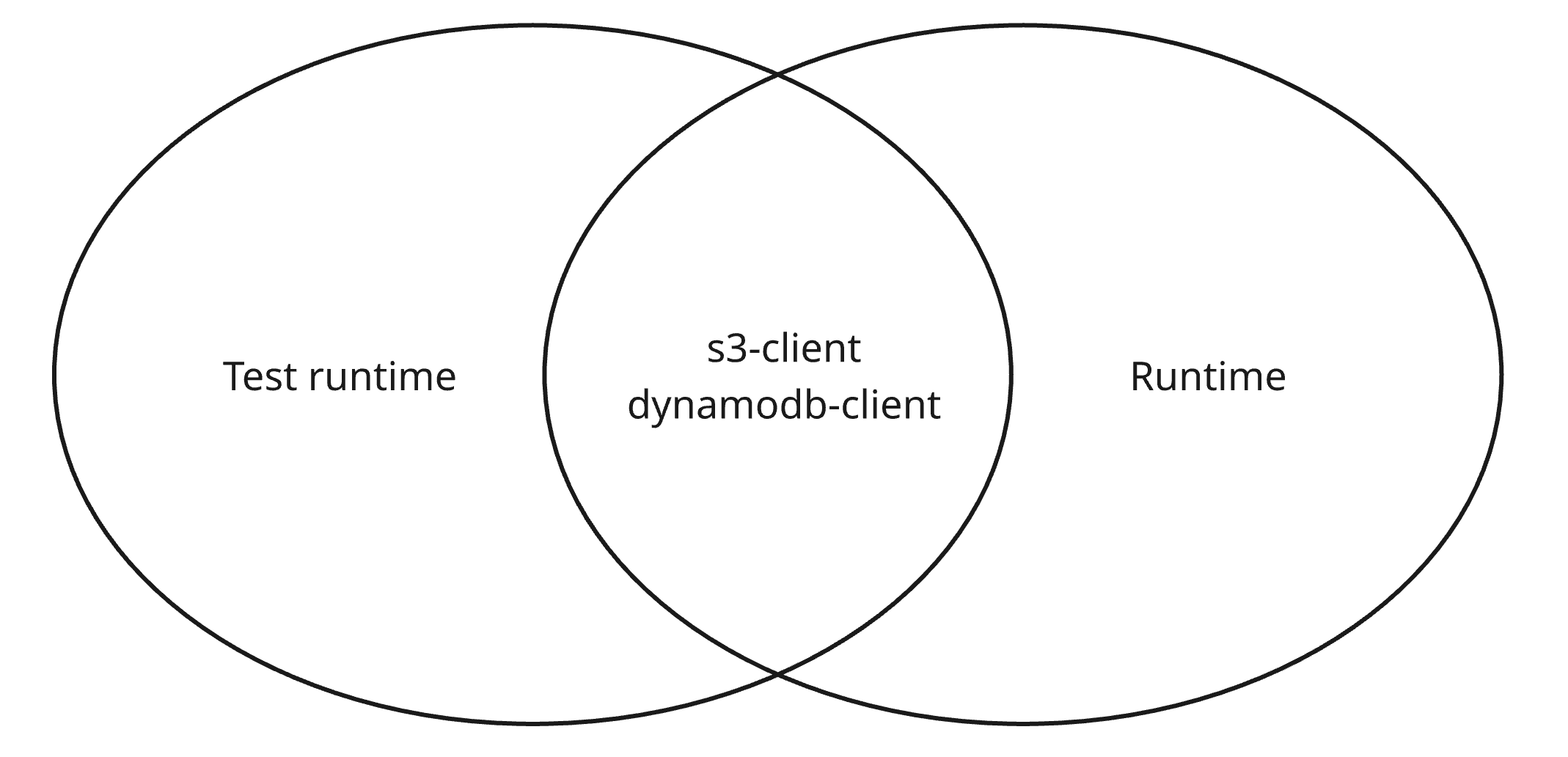
다음과 같이 규칙을 따라 코드를 작성한다. 아래는 DynamoDB 클라이언트 모듈이다.
- 내부에 클라이언트 객체를 선언하고, 외부에서 클라이언트 객체를 주입할 수 있도록 세터(setter) 함수를 노출한다.
- 클라이언트 객체는 외부로 노출하지 않는다.
- putItem 같은 기능들을 노출한다.
import { DynamoDBClient } from "@aws-sdk/client-dynamodb";
import { DynamoDBDocumentClient, PutCommand } from "@aws-sdk/lib-dynamodb";
import type { DynamoDbItem } from "./types";

let dynamodbClient: DynamoDBClient;

const endpoint = process.env.DYNAMODB_ENDPOINT || "http://localstack:4566";
const region = process.env.AWS_REGION || "ap-northeast-1";
export const tableName = process.env.DYNAMODB_TABLE || "test";

const client = (): DynamoDBDocumentClient => {
  if (!dynamodbClient) {
    dynamodbClient = new DynamoDBClient({ region, endpoint });
  }
  return DynamoDBDocumentClient.from(dynamodbClient);
};

export const setClient = (client: DynamoDBClient) => {
  dynamodbClient = client;
};

export const putItem = async (item: DynamoDbItem) => {
  const ddbClient = client();
  const putItemCommand = new PutCommand({ TableName: tableName, Item: item });
  await ddbClient.send(putItemCommand);
};
아래는 S3 클라이언트 모듈이다. 동일한 규칙을 따라 코드를 작성한다.
import {
  GetObjectCommand,
  type GetObjectCommandInput,
  type GetObjectCommandOutput,
  S3Client,
} from "@aws-sdk/client-s3";

let s3Client: S3Client;

const endpoint = process.env.S3_ENDPOINT || "http://localhost:4566";
const region = process.env.AWS_REGION || "ap-northeast-1";
export const bucketName = process.env.S3_BUCKET || "test-bucket";

const client = () => {
  if (!s3Client) {
    s3Client = new S3Client({ region, endpoint, forcePathStyle: true });
  }
  return s3Client;
};

export const setClient = (client: S3Client) => {
  s3Client = client;
};

export const getObject = async (
  key: string,
): Promise<GetObjectCommandOutput> => {
  const s3 = client();
  const commandInput: GetObjectCommandInput = {
    Bucket: bucketName,
    Key: key,
  };
  const command = new GetObjectCommand(commandInput);
  return await s3.send(command);
};
2. Setup file for test
테스트 컨테이너를 사용해 테스트를 작성하기 위해선 다음과 같은 의존성이 필요하다.
$ npm install -D vitest testcontainers @testcontainers/localstack
테스트 코드를 작성하기 전 셋업(setup) 파일을 만든다. 테스트 컨테이너는 단위 테스트에 비해 비용이 매우 비싸다. 컨테이너 이미지를 다운로드 받고, 실행하는데 시간이 소요된다. 컨테이너 이미지를 다운로드 받는 것은 최초 1회만 수행하지만, 컨테이너를 실행하고 내리는 것도 비용이 작지 않다. 모든 테스트마다 컨테이너를 띄우고, 내리는 작업을 수행하는 것은 비합리적이다. 이를 위해 다음과 같은 코드가 필요하다.
- 컨테이너를 실행/종료 작업은 1회만 실행한다. (beforeAll, afterAll)
- 각 테스트마다 깨끗한 컨텍스트를 위해 DynamoDB 테이블을 생성/삭제 작업과 S3 버킷 정리 작업은 각 테스트마다 실행한다. (beforeEach, afterEach)
위 작업은 모든 테스트 파일마다 정의할 필요가 없다. 모든 테스트 파일에 적용되도록 setup.ts 파일을 만든다. 지금부터 setup.ts 코드 내용을 하나씩 살펴보자. 먼저 테스트가 실행될 때 1회 수행되는 beforeAll, afterAll 사이클에 다음과 같은 코드를 작성한다.
- beforeAll 사이클
- LocalStack 컨테이너를 실행한다. 테스트 컨테이너를 기준으로 엔드포인트, 리전 같은 접속 정보를 구성한다.
- 테스트를 위한 DynamoDB, S3 클라이언트를 생성한다. 각 클라이언트 객체는 테스트 코드에서 사용할 수 있도록 모듈 외부로 노출한다.
- 각 클라이언트를 구현 코드에서도 사용할 수 있도록 위에서 정의한 세터 함수를 통해 각 클라이언트 모듈에 주입한다.
- S3 버킷을 생성한다. 버킷을 삭제하기 위해선 버킷을 비워야 하기 때문에 매번 생성/삭제가 번거롭다. 한 번 생성하고 이를 재사용한다.
- 컨테이너를 준비하는 시간이 많이 소요될 수 있으므로 타임아웃 시간을 2분으로 설정한다.
- afterAll 사이클
- LocalStack 컨테이너를 종료한다.
import type { StartedTestContainer } from "testcontainers"
import { BillingMode, CreateTableCommand, DeleteTableCommand, DynamoDBClient } from "@aws-sdk/client-dynamodb"
import { CreateBucketCommand, DeleteObjectCommand, ListObjectsV2Command, S3Client } from "@aws-sdk/client-s3"
import { LocalstackContainer } from "@testcontainers/localstack"
import { afterAll, afterEach, beforeAll, beforeEach } from 'vitest'
import { setClient as setS3Client } from "./src/common/s3-client"
import { setClient as setDynamoDBClient } from "./src/common/dynamodb-client"

const region: string = process.env.AWS_REGION || 'ap-northeast-1'
const table: string = process.env.DYNAMODB_TABLE || 'test-table'
const bucket: string = process.env.S3_BUCKET || 'test-bucket'

let container: StartedTestContainer
export let testDynamoDBClient: DynamoDBClient
export let testS3Client: S3Client

beforeAll(async () => {
  container = await new LocalstackContainer('localstack/localstack:latest').start()
  const awsConfig = {
    endpoint   : `http://${container.getHost()}:${container.getMappedPort(4566)}`,
    credentials: {
      accessKeyId    : 'test',
      secretAccessKey: 'test'
    },
    region
  }
  testDynamoDBClient = new DynamoDBClient(awsConfig)
  testS3Client = new S3Client({ ...awsConfig, forcePathStyle: true })
  setS3Client(testS3Client)
  setDynamoDBClient(testDynamoDBClient)
  await createBucketIfNotExists()
}, 120000)

afterAll(async () => {
  if (container) {
    await container.stop()
  }
})

const createBucketIfNotExists = async () => {
  try {
    await testS3Client.send(
      new CreateBucketCommand({
        Bucket: bucket
      }))
  } catch (e: unknown) {
    const error = e as Error
    console.log(error.message)
  }
}

...
각 테스트마다 컨텍스트를 깨끗히 정리하는 코드는 beforeEach, afterEach 사이클에 작성한다.
- beforeEach 사이클
- S3 버킷의 저장된 객체들을 모두 삭제한다.
- DynamoDB 테이블을 생성한다.
- afterEach 사이클
- DynamoDB 테이블을 삭제한다.
import type { StartedTestContainer } from "testcontainers"
import { BillingMode, CreateTableCommand, DeleteTableCommand, DynamoDBClient } from "@aws-sdk/client-dynamodb"
import { CreateBucketCommand, DeleteObjectCommand, ListObjectsV2Command, S3Client } from "@aws-sdk/client-s3"
import { LocalstackContainer } from "@testcontainers/localstack"
import { afterAll, afterEach, beforeAll, beforeEach } from 'vitest'
import { setClient as setS3Client } from "./src/common/s3-client"
import { setClient as setDynamoDBClient } from "./src/common/dynamodb-client"

...

beforeEach(async () => {
  await emptyBucket()
  await createTable()
})

afterEach(async () => {
  await deleteTable()
})

const emptyBucket = async () => {
  const objects = await testS3Client.send(new ListObjectsV2Command({ Bucket: bucket }))
  if (!objects.Contents?.length) {
    return
  }
  for (const content of objects.Contents) {
    await testS3Client.send(
      new DeleteObjectCommand({
        Bucket: bucket,
        Key   : content.Key
      })
    )
  }
}

const createTable = async () => {
  await testDynamoDBClient.send(
    new CreateTableCommand({
      TableName           : table,
      BillingMode         : BillingMode.PAY_PER_REQUEST,
      AttributeDefinitions: [
        { AttributeName: 'pk', AttributeType: 'S' },
        { AttributeName: 'sk', AttributeType: 'S' }
      ],
      KeySchema           : [
        { AttributeName: 'pk', KeyType: 'HASH' },
        { AttributeName: 'sk', KeyType: 'RANGE' }
      ]
    })
  )
}

const deleteTable = async () => {
  await testDynamoDBClient.send(
    new DeleteTableCommand({
      TableName: table
    })
  )
}
setup.ts 파일 작성이 모두 완료되면 테스트와 함께 실행되도록 이를 vitest.config.mjs 파일에 등록한다.
/// <reference types="vitest" />
import {defineConfig} from 'vitest/config'
import {fileURLToPath} from 'node:url'
import path from 'node:path'

const __dirname = path.dirname(fileURLToPath(import.meta.url))

export default defineConfig({
    test: {
        globals: true,
        environment: 'node',
        setupFiles: ['./setup.ts'], // 등록
        include: ['**/*.test.ts'],
        disableConsoleIntercept: true
    },
    resolve: {
        alias: {
            '@': path.resolve(__dirname, '.')
        }
    }
})
3. Test and implementation codes
람다 환경을 가정한 테스트 및 구현 코드를 작성하기 위해 다음과 같은 의존성이 필요하다.
$ npm install -D @types/aws-lambda
간단한 테스트 코드와 구현 코드를 통해 테스트 컨테이너를 사용한 테스트가 정상적으로 수행되는지 확인해본다. 먼저 DynamoDB에 사용자 데이터를 저장하는 핸들러에 대한 테스트 코드를 살펴보자. 다음 두 가지 케이스에 대해 테스트한다.
- 200 상태
- 정상적으로 데이터가 저장되고 200 상태 코드를 응답한다.
- DynamoDB에 사용자 정보가 저장되었는지 확인한다.
- 400 상태
- 요청 파라미터에 필요한 정보가 없는 경우 400 상태 코드(bad request)를 응답한다.
- DynamoDB에 저장된 데이터가 없는지 확인한다.
import { GetCommand, ScanCommand } from "@aws-sdk/lib-dynamodb";
import type { APIGatewayProxyWithCognitoAuthorizerEvent } from "aws-lambda";
import { expect, test } from "vitest";
import { tableName } from "../common/dynamodb-client";
import { testDynamoDBClient } from "../setup";
import { handler } from "./handler";

test("save user information then respond ok", async () => {
  const event = {
    body: '{"name":"jun"}',
  } as unknown as APIGatewayProxyWithCognitoAuthorizerEvent;

  const response = await handler(event);

  expect(response).toEqual({
    statusCode: 200,
    headers: { "Access-Control-Allow-Origin": "*" },
    body: '{"message":"ok"}',
  });
  const result = await testDynamoDBClient.send(
    new GetCommand({
      TableName: tableName,
      Key: { pk: "USER", sk: "NAME#jun" },
    }),
  );
  expect(result.Item).toEqual({
    pk: "USER",
    sk: "NAME#jun",
    name: "jun",
  });
});

test("body is empty then respond bad request", async () => {
  const event = {} as unknown as APIGatewayProxyWithCognitoAuthorizerEvent;

  const response = await handler(event);

  expect(response).toEqual({
    statusCode: 400,
    headers: { "Access-Control-Allow-Origin": "*" },
    body: "Bad Request",
  });
  const result = await testDynamoDBClient.send(
    new ScanCommand({
      TableName: tableName,
    }),
  );
  expect(result.Items?.length).toEqual(0);
});
DynamoDB를 사용하는 구현 코드는 다음과 같다.
- 요청 바디를 파싱(parsing) 후 필요한 프로퍼티가 없는 경우 400 상태 코드를 응답한다.
- DynamoDB에 사용자 정보를 저장 후 에러가 발생하지 않으면 200 상태 코드를 응답한다.
import type {
  APIGatewayProxyResult,
  APIGatewayProxyWithCognitoAuthorizerEvent,
} from "aws-lambda";
import { putItem } from "../common/dynamodb-client";
import { badRequest, internalServerError, ok } from "../common/responses";

export const handler = async (
  event: APIGatewayProxyWithCognitoAuthorizerEvent,
): Promise<APIGatewayProxyResult> => {
  try {
    const body = JSON.parse(event.body || "{}");
    if (!body.name) {
      return badRequest();
    }
    await putItem({ pk: "USER", sk: `NAME#${body.name}`, name: body.name });
    return ok(JSON.stringify({ message: "ok" }));
  } catch (_e: unknown) {
    return internalServerError();
  }
};
이번엔 S3 객체 스토리지를 사용하는 기능에 대한 테스트 코드를 살펴보자. 다음과 같은 케이스들에 대해 테스트한다.
- 200 상태
- S3 스토리지에 준비된 파일을 조회 후 정상적으로 응답한다.
- 400 상태
- 쿼리 ‘key’가 없는 경우 400 상태 코드를 응답한다.
- 404 상태
- S3 스토리지에 조회 ‘key’에 해당하는 객체가 없다면 404 상태 코드를 응답한다.
import {
  PutObjectCommand,
  type PutObjectCommandInput,
} from "@aws-sdk/client-s3";
import type { APIGatewayProxyWithCognitoAuthorizerEvent } from "aws-lambda";
import { expect, test } from "vitest";
import { bucketName } from "../common/s3-client";
import { testS3Client } from "../setup";
import { handler } from "./handler";

test("get download file then respond ok with file data", async () => {
  const input: PutObjectCommandInput = {
    Bucket: bucketName,
    Key: "foo/bar/temp.txt",
    ContentType: "text/plain",
    Body: Buffer.from("hello"),
  };
  await testS3Client.send(new PutObjectCommand(input));
  const event = {
    queryStringParameters: {
      key: "foo/bar/temp.txt",
    },
  } as unknown as APIGatewayProxyWithCognitoAuthorizerEvent;

  const result = await handler(event);

  expect(result).toEqual({
    statusCode: 200,
    headers: {
      "Content-Type": "text/plain",
      "Content-Disposition": 'attachment; filename="temp.txt"',
      "Access-Control-Allow-Origin": "*",
    },
    body: "aGVsbG8=",
    isBase64Encoded: true,
  });
});

test("key is undefined then respond bad request", async () => {
  const event = {} as unknown as APIGatewayProxyWithCognitoAuthorizerEvent;

  const response = await handler(event);

  expect(response).toEqual({
    statusCode: 400,
    headers: {
      "Access-Control-Allow-Origin": "*",
    },
    body: "Bad Request",
  });
});

test("item is not existed in s3 then respond not found", async () => {
  const event = {
    queryStringParameters: {
      key: "foo/bar/temp.txt",
    },
  } as unknown as APIGatewayProxyWithCognitoAuthorizerEvent;

  const response = await handler(event);

  expect(response).toEqual({
    statusCode: 404,
    headers: {
      "Access-Control-Allow-Origin": "*",
    },
    body: "Not Found",
  });
});
S3 객체 스토리지를 사용한 구현 코드는 다음과 같다.
- 이벤트에서 조회를 위한 ‘key’가 없는 경우 400 상태 코드를 응답한다.
- S3 객체 스토리지에서 파일을 조회한다. 조회된 파일의 바이트 배열(byte array)를 Base64으로 인코딩 후 이를 반환한다.
- S3 객체 스토리지에서 파일을 찾을 수 없는 경우 404 상태 코드를 응답한다.
import type {
  APIGatewayProxyResult,
  APIGatewayProxyWithCognitoAuthorizerEvent,
} from "aws-lambda";
import { getObject } from "../common/s3-client";
import {
  badRequest,
  internalServerError,
  notFound,
  ok,
} from "../common/responses";

export const handler = async (
  event: APIGatewayProxyWithCognitoAuthorizerEvent,
): Promise<APIGatewayProxyResult> => {
  try {
    const key = event.queryStringParameters?.key;
    if (!key) {
      return badRequest();
    }

    const response = await getObject(key);
    if (!response?.Body) {
      return notFound();
    }

    const byteArray = await response.Body.transformToByteArray();
    const buffer = Buffer.from(byteArray);
    const base64Body = buffer.toString("base64");

    return ok(base64Body, {
      header: {
        "Content-Type": response.ContentType || "application/octet-stream",
        "Content-Disposition": `attachment; filename="temp.txt"`,
        "Access-Control-Allow-Origin": "*",
      },
      isBase64Encoded: true,
    });
  } catch (e: unknown) {
    if (e instanceof Error && e["name"] === "NoSuchKey") {
      return notFound();
    }
    return internalServerError();
  }
};
댓글남기기