커스텀 FeignClient 디코더
강준현
- spring-boot
- spring-cloud
이 글의 목차
0. 들어가면서
최근 프로젝트에서 레거시 서버와 연결하면서 응답 메시지에 다음과 같은 문제가 있었다.
- 홑따옴표(‘)로 묶인 키(key), 값(value)로 구성된 JSON 형식
- 홑따옴표는 이스케이핑(escaping) 처리
예를 들면 다음과 같은 메시지를 응답 받았다.
[{'id': '0001', 'title': 'hello world', 'content': 'this is post test for feign client'}]FeignClient를 사용하고 있었고, 두 가지 옵션을 생각했다.
- 프록시(proxy) 객체를 만들고, 프록시 내부에서 관련된 언이스케이프(unescape) 처리 및 객체 생성
- 커스텀
SpringDecoder를 만들고, 해당FeignClient객체에 주입
스프링(spring) 프레임워크의 기능이 필요하지만, 관심사를 분리하자는 차원에서 SpringDecoder 기능을 확장하였다. 이번 포스트에선 커스텀 SpringDecoder 객체를 적용하는 방법에 대해 정리하였다.
1. Encoding and Decoding
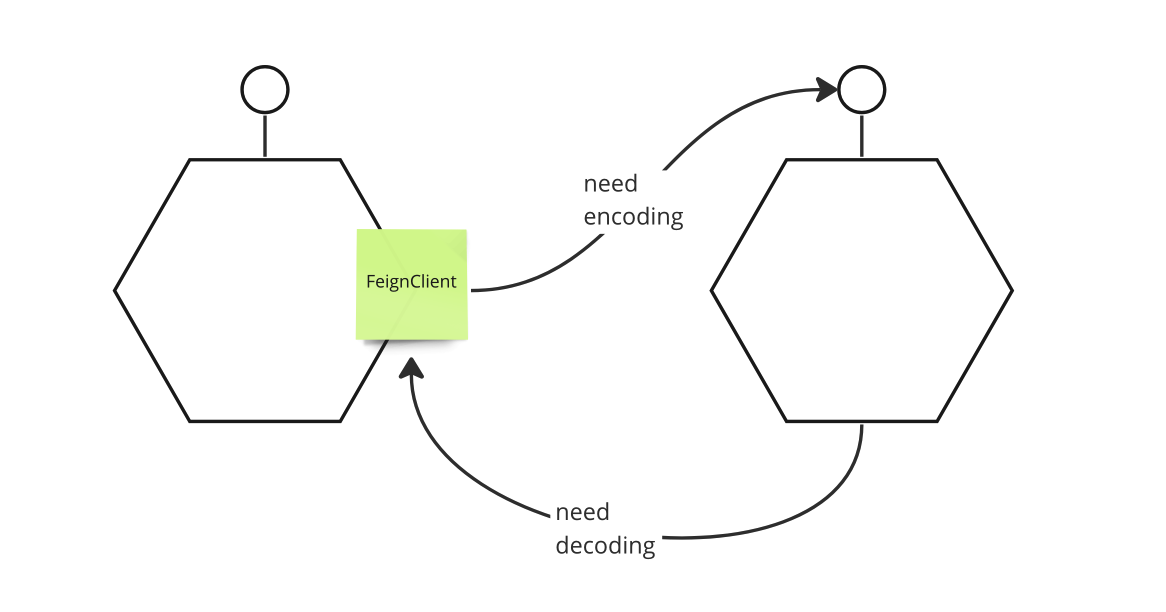
인코딩(encoding)과 디코딩(decoding)에 대한 개념을 먼저 살펴보겠다. 애플리케이션에서 사용하는 객체들은 서비스들 사이의 통신에서 그대로 사용하지 못한다. 서비스들 사이에 실제 통신은 바이트 배열(byte array)을 통해 이뤄진다. 애플리케이션의 객체와 바이트 배열 사이의 변환이 필요한데 이런 과정을 인코딩, 디코딩이라 한다.
- 인코딩(encoding)
- 메시지를 담은 객체를 바이트 배열로 변경한다.
- 디코딩(decoding)
- 바이트 배열을 메시지를 담은 객체로 변경한다.
2. Implementation
간단한 예제 코드를 구현하고, 테스트해보겠다. 디코딩 과정은 다음 과정을 거친다.
- 메시지 언이스케이프
[{'id': '0001'}]>[{'id': '0001'}]
- 홑따옴표로 구성된 JSON 메시지 객체화
[{'id': '0001'}]>List<Post>
2.1. build.gradle
실습을 위해서 다음과 같은 의존성들이 필요하다.
dependencies {
    implementation 'org.springframework.boot:spring-boot-starter-web'
    implementation 'org.springframework.cloud:spring-cloud-starter-openfeign'
    implementation group: 'commons-io', name: 'commons-io', version: '2.11.0'
    implementation group: 'org.apache.commons', name: 'commons-lang3', version: '3.12.0'
    compileOnly 'org.projectlombok:lombok'
    annotationProcessor 'org.projectlombok:lombok'
    testImplementation 'org.springframework.boot:spring-boot-starter-test'
    testImplementation 'org.springframework.cloud:spring-cloud-starter-contract-stub-runner'
}
2.2. UnescapingHtml4Decoder Class
- 언이스케이핑 처리를 위한 디코더 클래스이다.
SpringDecoder클래스를 확장한다.decode메서드 기능을 확장한다.IOUtils클래스를 통해 응답(response body)에서 메시지를 추출한다.StringEscapeUtils클래스를 통해 메시지를 언이스케이프 처리한다.
package action.in.blog.config;

import feign.FeignException;
import feign.Response;
import org.apache.commons.io.IOUtils;
import org.apache.commons.lang3.StringEscapeUtils;
import org.springframework.beans.factory.ObjectFactory;
import org.springframework.boot.autoconfigure.http.HttpMessageConverters;
import org.springframework.cloud.openfeign.support.SpringDecoder;

import java.io.IOException;
import java.lang.reflect.Type;
import java.nio.charset.StandardCharsets;

public class UnescapingHtml4Decoder extends SpringDecoder {

    public UnescapingHtml4Decoder(ObjectFactory<HttpMessageConverters> messageConverters) {
        super(messageConverters);
    }

    @Override
    public Object decode(Response response, Type type) throws IOException, FeignException {
        Response.Body body = response.body();
        String responseValue = IOUtils.toString(body.asReader(StandardCharsets.UTF_8));
        return super.decode(
                Response.builder()
                        .status(response.status())
                        .request(response.request())
                        .headers(response.headers())
                        .body(StringEscapeUtils.unescapeHtml4(responseValue), StandardCharsets.UTF_8)
                        .build(),
                type);
    }
}
2.3. BlogClientConfig Class
- 홑따옴표로 구성된 JSON 메시지를 객체로 변경할 수 있는 컨버터를 만든다.
ObjectMapper객체에ALLOW_SINGLE_QUOTES설정을 추가한다.MappingJackson2HttpMessageConverter메시지 컨버터(converter) 객체를 생성한다.- 메시지 컨버터 내부에서 사용하는 모듈은
ObjectMapper객체이다. - 메시지 컨버터가 지원하는 메시지 포맷을 지정한다.
- 메시지 컨버터 내부에서 사용하는 모듈은
ObjectFactory객체를 만들어UnescapingHtml4Decoder에 주입한다.
package action.in.blog.config;

import com.fasterxml.jackson.core.JsonParser;
import com.fasterxml.jackson.databind.ObjectMapper;
import org.springframework.beans.factory.ObjectFactory;
import org.springframework.boot.autoconfigure.http.HttpMessageConverters;
import org.springframework.cloud.openfeign.support.SpringDecoder;
import org.springframework.context.annotation.Bean;
import org.springframework.context.annotation.Configuration;
import org.springframework.http.converter.json.MappingJackson2HttpMessageConverter;

import static java.util.Arrays.asList;
import static org.springframework.http.MediaType.*;


@Configuration
public class BlogClientConfig {

    @Bean
    public SpringDecoder springDecoder() {
        final ObjectMapper objectMapper = new ObjectMapper();
        objectMapper.configure(JsonParser.Feature.ALLOW_SINGLE_QUOTES, true);
        final MappingJackson2HttpMessageConverter jacksonConverter = new MappingJackson2HttpMessageConverter(objectMapper);
        jacksonConverter.setSupportedMediaTypes(asList(APPLICATION_JSON, APPLICATION_OCTET_STREAM, APPLICATION_JSON_UTF8));
        final ObjectFactory<HttpMessageConverters> objectFactory = () -> new HttpMessageConverters(jacksonConverter);
        return new UnescapingHtml4Decoder(objectFactory);
    }
}
2.4. BlogClient Interface
- 통신에 사용하는
FeignClient객체가 사용할 수 있도록 설정 빈 객체를 지정한다.
package action.in.blog.client;

import action.in.blog.config.BlogClientConfig;
import action.in.blog.domain.Post;
import org.springframework.cloud.openfeign.FeignClient;
import org.springframework.web.bind.annotation.GetMapping;

import java.util.List;

@FeignClient(name = "blog-client", url = "${server-url}", configuration = {BlogClientConfig.class})
public interface BlogClient {

    @GetMapping("/posts")
    List<Post> getPosts();
}
3. Test
WireMock을 사용해 테스트를 수행한다.- 이스케이핑된 메시지를 준비하고, 특정 경로에 대한 응답으로 이를 반환한다.
- 정상적으로 값이 매칭된 객체를 응답받는지 확인한다.
package action.in.blog;

import action.in.blog.client.BlogClient;
import action.in.blog.domain.Post;
import org.junit.jupiter.api.Test;
import org.springframework.beans.factory.annotation.Autowired;
import org.springframework.boot.test.context.SpringBootTest;
import org.springframework.cloud.contract.wiremock.AutoConfigureWireMock;
import org.springframework.test.context.TestPropertySource;

import java.util.List;

import static com.github.tomakehurst.wiremock.client.WireMock.*;
import static org.hamcrest.MatcherAssert.assertThat;
import static org.hamcrest.Matchers.equalTo;

@SpringBootTest
@AutoConfigureWireMock(port = 0)
@TestPropertySource(
        properties = {
                "server-url=http://localhost:${wiremock.server.port}"
        }
)
class ActionInBlogApplicationTests {

    @Autowired
    BlogClient sut;

    @Test
    void feign_client_decoding_escaped_message() {
        String expectResponse = "[{'id': '0001', 'title': 'hello world', 'content': 'this is post test for feign client'}]";
        stubFor(get("/posts")
                .willReturn(
                        aResponse().withBody(expectResponse)
                ));


        List<Post> result = sut.getPosts();


        assertThat(result.size(), equalTo(1));
        Post post = result.get(0);
        assertThat(post.getId(), equalTo("0001"));
        assertThat(post.getTitle(), equalTo("hello world"));
        assertThat(post.getContent(), equalTo("this is post test for feign client"));
    }
}
Test Result
BUILD SUCCESSFUL in 12s
4 actionable tasks: 3 executed, 1 up-to-date
1:09:51 PM: Execution finished ':test --tests "action.in.blog.ActionInBlogApplicationTests.contextLoads"'.
TEST CODE REPOSITORY
REFERENCE
- https://docs.spring.io/spring-cloud-openfeign/docs/current/reference/html/
- https://velog.io/@haron/Feign-client-%EC%A0%81%EC%9A%A9%EA%B8%B0
- https://sabarada.tistory.com/116
- https://gist.github.com/Darguelles/d9f76f29a74e7ed6e8c305098ea3469b
- https://www.educative.io/answers/how-to-parse-single-quotes-json-using-jackson-in-java
KEEP READING
함께 읽으면 좋은 글
DISCUSSION