JavaScript에서 객체 생성하기
강준현
- javascript
이 글의 목차
1. 객체 생성하기
JavaScript는 두 가지 방법으로 객체를 생성할 수 있다.
두 가지 방법을 모두 살펴보고 차이점에 대해 정리해본다.
예시 코드들은 브라우저 개발자 모드(F12)의 콘솔(console)에서 실행할 수 있다.
1.1. Literal Object
- 리터럴 객체(literal object)는 직관적이고 쉽게 객체를 생성하는 방법이다.
{}안에 객체가 가진 속성(property)들을 정의한다.
let person = {
    name: 'Junhyunny',
    sayName: function () {
        console.log(`My name is ${this.name}`);
    }
};

person.sayName();

console.dir(person);
Result
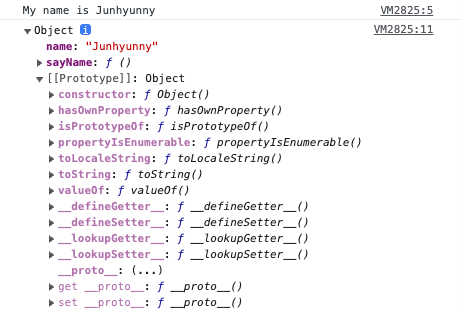
- “My name is Junhyunny” 라는 문구를 볼 수 있다.
dir함수를 통해 객체 구조를 살펴볼 수 있다.
1.2. Pain Point of Literal Object
리터럴 객체는 쉽고 직관적이지만, 다음과 같은 불합리함이 존재한다.
- 하나의 객체만 생성한다.
- 동일한 속성들을 가지는 객체를 여러 개 생성하는 경우 불합리하다.
let junhyunny = {
    name: 'Junhyunny',
    sayName: function () {
        console.log(`My name is ${this.name}`);
    }
};

let jua = {
    name: 'Jua',
    sayName: function () {
        console.log(`My name is ${this.name}`);
    }
};

junhyunny.sayName();
jua.sayName();
2. Constructor Function
JavaScript는 동일한 모습의 객체를 여러개 만들기 위해 더 효율적인 방법을 제공한다.
- 생성자 함수(constructor function)로 객체를 만들 수 있다.
new연산자와 함께 함수를 호출하면 객체를 만들기 위한 생성자 함수로서 실행된다.
- 파스칼 네이밍 컨벤션(pascal naming convention)을 따라 생성자로 사용하는 함수의 앞 글자는 대문자를 사용한다.
function Person(name) {
    this.name = name;
    this.sayName = function () {
        console.log(`My name is ${this.name}`)
    }
};

let junhyunny = new Person('Junhyunny');
let jua = new Person('jua');

junhyunny.sayName();
jua.sayName();

console.dir(junhyunny);
Result
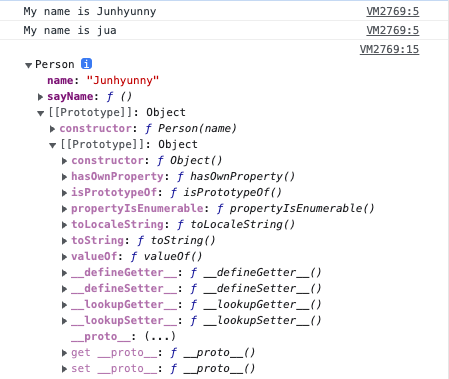
- 다음과 같은 문장을 콘솔에서 볼 수 있다.
- “My name is Junhyunny”
- “My name is Jua”
dir함수를 통해 Person 객체의 구조를 살펴볼 수 있다.
2.1. How does constructor work?
new 연산자와 함께 함수를 호출하면 다음과 같은 과정이 일어난다.
- 처음 함수를 호출하면 객체(instance)가 생성된다.
- 생성된 객체는
this키워드에 바인딩된다.
this키워드에 바인딩 된 객체의 속성들을 초기화한다.return키워드가 없는 경우 암묵적으로this키워드에 바인딩 된 객체가 반환된다.
function Person(name) {
    // 인스턴스(instance)가 생성되며, this 키워드에 바인딩됩니다.
    console.log(this);

    this.name = name;
    this.sayName = function () {
        console.log(`My name is ${this.name}`)
    }

    // 암묵적으로 this 키워드를 반환합니다.
};

new Person('Junhyunny');
2.2. Call constructor without new keyword
new 연산자 없이 생성자 함수를 호출하면 어떤 현상이 있는지 확인해본다.
function Person(name) {
    this.name = name;
    this.sayName = function () {
        console.log(`My name is ${this.name}`)
    }
};

let junhyunny = Person('Junhyunny');

console.log('junhyunny - ', junhyunny);
console.log('window.name - ', window.name);

window.sayName();
Result
new키워드 없이 생성자 함수를 호출하는 것은 일반 함수를 호출하는 것과 동일하게 동작한다.- 별도 반환 값이 없기 때문에 코드의
junhyunny객체는undefined이다.
- 별도 반환 값이 없기 때문에 코드의
Person함수는 전역 객체가 호출하였기 때문에this키워드에는window객체가 바인딩된다.Person함수 호출 시 내부this키워드에 바인딩되는 객체는 해당 함수를 호출한 객체이다.window객체에name속성과sayName()메서드가 만들어진다.

2.3. Constructor Function with Return Value
new 연산자와 함께 호출하는 생성자 함수는 별도로 반환하는 값이 없다.
하지만 암묵적으로 this 키워드에 바인딩 된 객체를 반환한다.
생성자 함수가 특정 값을 반환하는 경우 어떤 현상이 있는지 살펴본다.
2.3.1. Return Literal Object
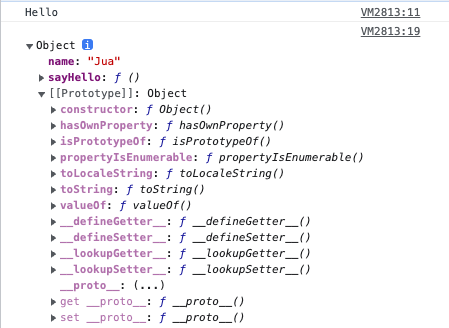
- 리터럴 객체를 반환하는 경우 생성자를 통해 만들어진 객체가 반환되지 않는다.
- 리터럴 객체가 그대로 반환된다.
function Person(name) {
    this.name = name;
    this.sayName = function () {
        console.log(`My name is ${this.name}`)
    }
    return {
        name: 'Jua',
        sayHello: function () {
            console.log('Hello');
        }
    };
};

let junhyunny = new Person('Junhyunny');
junhyunny.sayHello();

console.dir(junhyunny);
Result
2.3.2. Return Primitive Type
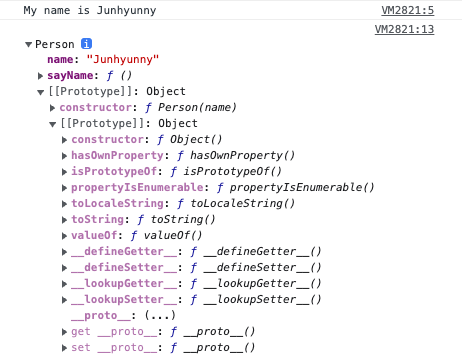
- 원시 값을 반환하는 경우
new연산자를 통해 함수를 만드는 것과 동일하게 동작한다. - 반환된 원시 타입의 값은 무시된다.
JavaScript에서 취급하는 원시 타입은 다음과 같다.- Boolean 타입
- Null 타입
- Undefined 타입
- Number 타입
- BigInt 타입
- String 타입
- Symbol 타입
- 생성자 함수 내부에서 명시적으로 다른 값을 반환하는 코드는 생성자 함수의 기본 동작을 훼손하기 때문에 지양한다.
function Person(name) {
    this.name = name;
    this.sayName = function () {
        console.log(`My name is ${this.name}`)
    }
    return 'Person';
};

let junhyunny = new Person('Junhyunny');
junhyunny.sayName();

console.dir(junhyunny);
Result
3. Difference between two methods of object creation
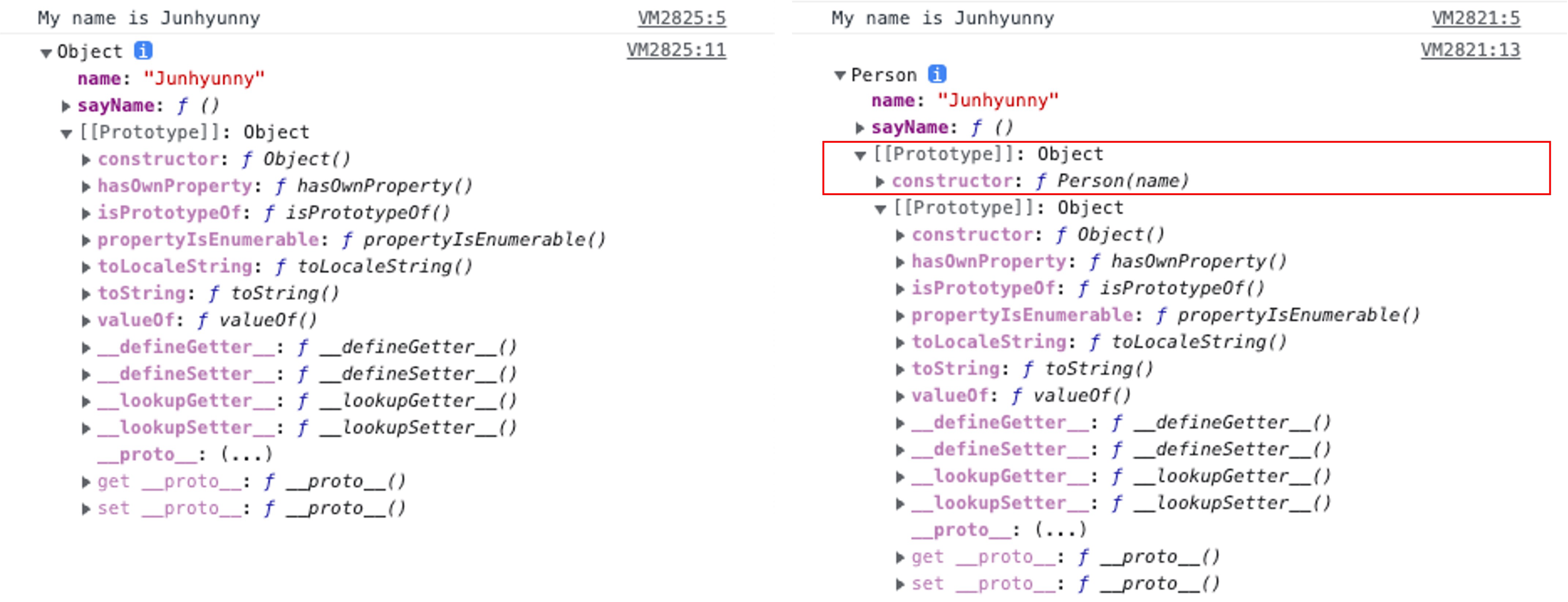
리터럴 방식으로 만들어진 객체와 생성자를 통해 만들어진 객체는 어떤 차이점이 있는지 살펴본다.
- 리터럴 방식으로 생성한 객체의
[[Prototype]]객체는Object(Object.prototype)이다. - 생성자 방식으로 생성한 객체의
[[Prototype]]객체는Person(Person.prototype)이다.constructor속성에Person함수가 지정되어 있다.- 한 단계 더 아래
[[Prototype]]객체는Object(Object.prototype)이다.
- 생성자 함수를 통해 객체를 생성하는 경우 프로토타입(prototype) 객체가 지정된다.
4. Pattern of Forced Object Creation
생성자 함수는 일반 함수처럼 사용할 수 있다.
맨 앞 글자가 대문자더라도 개발자가 실수로 new 연산자 없이 사용할 수 있다.
이런 실수를 보완하고자 생성자 함수를 new 연산자 없이 호출했을 때 인스턴스가 생성되도록 구현할 수 있다.
4.1. new.target keyword
ES6부터 지원한다.- 생성자 함수로서 호출하면
new.target은 함수 자신을 가리킨다. - 일반 함수로서 호출하면
new.target은undefined값을 가진다.
- 생성자 함수로서 호출하면
- 함수 내부에서
new.target키워드를 사용하여new연산자와 함께 호출되었는지 확인한다. - 아닌 경우 내부에서 생성자 함수를
new연산자와 함께 호출하여 그 결과를 반환한다.
function Person(name) {

    if (!new.target) {
        return new Person(name);
    }

    this.name = name;
    this.sayName = function () {
        console.log(`My name is ${this.name}`)
    }
    return 'Person';
};

let junhyunny = Person('Junhyunny');
junhyunny.sayName();

console.dir(junhyunny);
4.2. instanceof keyword
new.target키워드는ES6에서 도입된 최신 문법이며, IE(Internet Explorer)에선 지원하지 않는다.instanceof키워드로 대체하여 구현할 수 있다.
function Person(name) {

    if (!(this instanceof Person)) {
        return new Person(name);
    }

    this.name = name;
    this.sayName = function () {
        console.log(`My name is ${this.name}`)
    }
    return 'Person';
};

let junhyunny = Person('Junhyunny');
junhyunny.sayName();

console.dir(junhyunny);
REFERENCE
KEEP READING
함께 읽으면 좋은 글
DISCUSSION