자바 스레드 풀(Java Thread Pool)
- java
이 글의 목차
1. Thread Pool
스레드 풀(thread pool)은 프로그램의 동시성 실행을 지원하는 디자인 패턴이다. 복제된 작업자(replicated workers) 또는 작업자-크루(worker-crew) 모델이라고 불리기도 한다. 스레드 풀은 여러 스레드를 유지·관리하고, 풀 내의 스레드는 작업(task)이 할당되기를 기다린다.
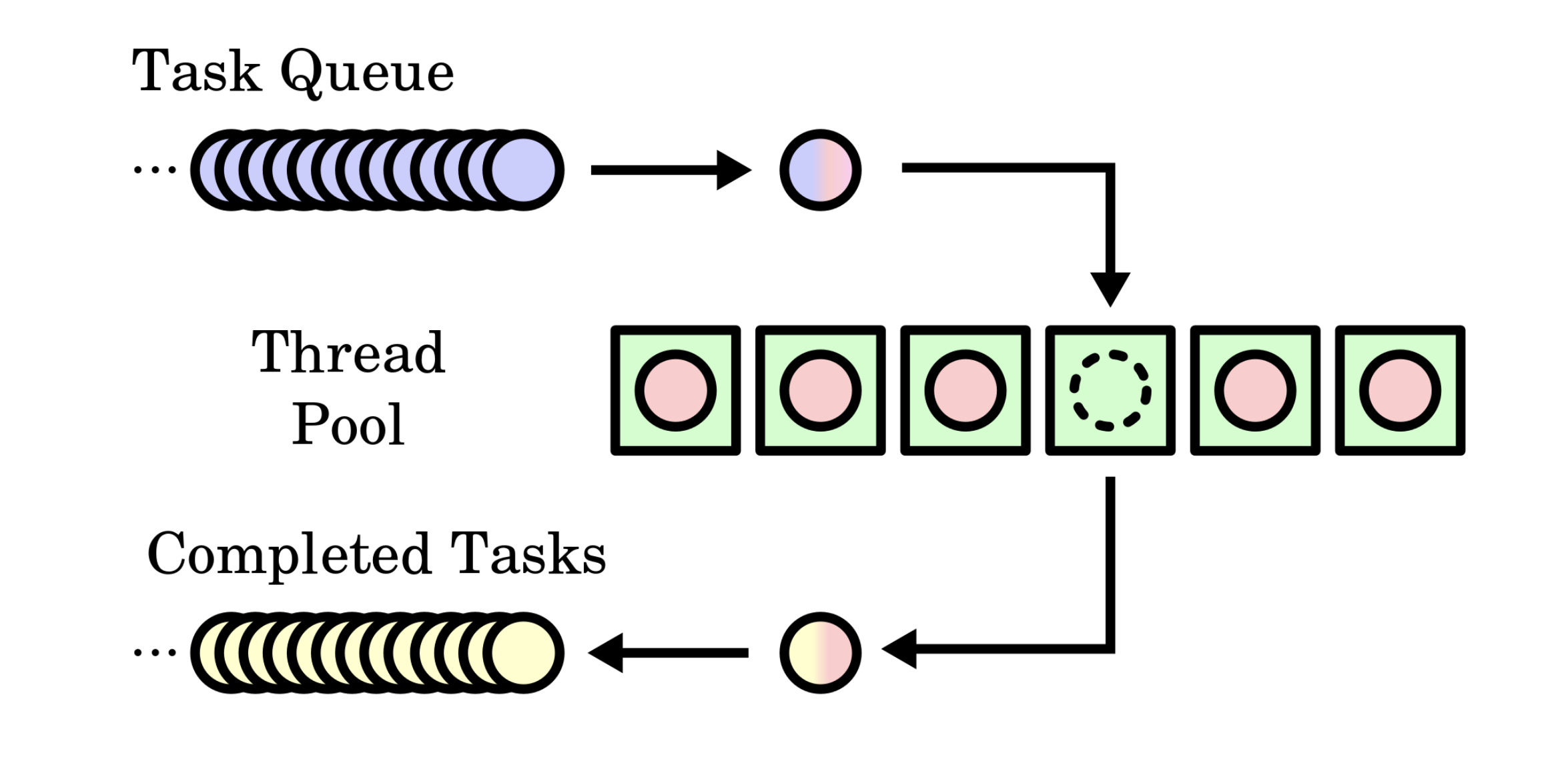
스레드 풀은 다음과 같은 문제를 해결하기 위해 사용한다.
- 짧은 작업을 위해 스레드를 생성하고 수거하는 데 드는 비용을 줄일 수 있다. 스레드 생성과 수거는 운영체제 자원을 사용하기 때문에 비용이 크다.
- 미리 생성해 둔 스레드에 작업을 할당하기 때문에 실행 지연을 줄일 수 있다.
스레드 풀을 사용하려면 처리할 작업량을 고려해야 한다.
- 스레드 풀을 통해 처리할 작업의 양을 고려하여 자원을 할당해야 한다.
- 처리할 작업에 비해 너무 많은 스레드가 생성되어 있다면 메모리 낭비가 발생한다.
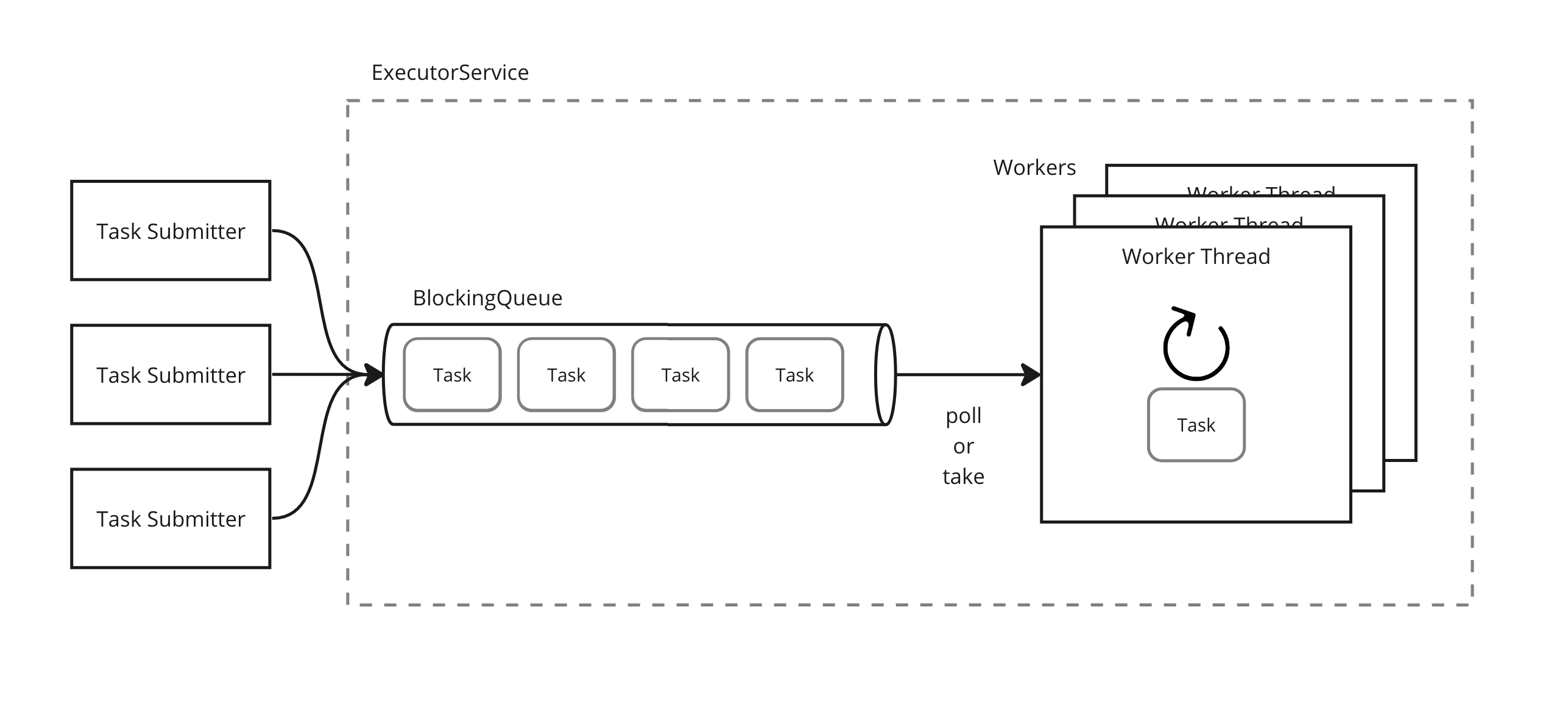
자바(Java)에서 제공하는 스레드 풀의 구조를 아래 이미지를 통해 살펴보자.
- Executors 클래스를 통해 생성되는 스레드 풀은 ExecutorService 인터페이스를 구현한 인스턴스(instance)들이다.
- 스레드 풀 인스턴스에는 작업을 담는 블록킹 큐(blocking queue)와 작업자 스레드(worker thread)들이 담긴 해시셋(HashSet)이 존재한다.
- 블록킹 큐에서 작업을 꺼내어 작업자 스레드에게 전달한다.
- 블록킹 큐에서 작업을 꺼낼 때 타임아웃(timeout) 여부에 따라 poll 혹은 take 메서드가 호출된다.
- 스레드의 타임아웃 여부는 코어 스레드 개수에 의해 판단된다.
2. Types of Thread Pool in Java
JDK 1.5부터 java.util.concurrent 패키지를 통해 동시성 관련 기능을 제공했다. 자바에서 스레드 풀 기능을 제공하는 주요 인터페이스와 클래스를 살펴본 후 각 스레드 풀의 특징을 살펴보자.
- Executors 클래스
- 정적 팩토리 메서드 패턴을 통해 스레드 풀 구현체 인스턴스를 생성한다.
- 이번 글에서 살펴볼 정적 팩토리 메서드들은 다음과 같다.
- newCachedThreadPool
- newFixedThreadPool
- newScheduledThreadPool
- ExecutorService 인터페이스
- 스레드 풀 기능을 제공하는 클래스들은 ExecutorService 인터페이스를 구현한다.
- 스레드 풀로서 제공해야 하는 API가 정의되어 있다.
- ExecutorService 인터페이스로 추상화된 메서드를 통해 스레드 풀 기능을 활용할 수 있다.
- ThreadPoolExecutor 클래스
- ExecutorService 인터페이스의 구현체 클래스이다.
- 생성자를 살펴보면 다음과 같은 파라미터를 전달받는다.
corePoolSize- 스레드 풀에 반드시 유지되어야 하는 스레드 개수이다.maximumPoolSize- 스레드 풀에 저장할 수 있는 최대 스레드 개수이다.keepAliveTime- 스레드 수가 코어 수보다 많은 경우, 쉬는 스레드가 종료되기 전에 새 작업을 기다리는 최대 시간이다.unit-keepAliveTime파라미터에 적용되는 시간 단위이다.workQueue- 처리되어야 하는 작업들이 저장되는 큐이다.threadFactory- 새로운 스레드를 만들 때 사용하는 팩토리 객체이다.handler- 큐 용량이 초과되어 작업 실행이 거부될 때 사용하는 핸들러 객체이다.
public class ThreadPoolExecutor extends AbstractExecutorService {

    // ...

    public ThreadPoolExecutor(int corePoolSize,
                              int maximumPoolSize,
                              long keepAliveTime,
                              TimeUnit unit,
                              BlockingQueue<Runnable> workQueue,
                              ThreadFactory threadFactory,
                              RejectedExecutionHandler handler) {
        if (corePoolSize < 0 ||
            maximumPoolSize <= 0 ||
            maximumPoolSize < corePoolSize ||
            keepAliveTime < 0)
            throw new IllegalArgumentException();
        if (workQueue == null || threadFactory == null || handler == null)
            throw new NullPointerException();
        this.corePoolSize = corePoolSize;
        this.maximumPoolSize = maximumPoolSize;
        this.workQueue = workQueue;
        this.keepAliveTime = unit.toNanos(keepAliveTime);
        this.threadFactory = threadFactory;
        this.handler = handler;
    }
}
먼저 캐시 스레드 풀(Cached Thread Pool)에 대해 살펴보자. newCachedThreadPool 팩토리 메서드를 통해 생성한다. 해당 스레드 풀은 다음과 같은 특징을 가진다.
- ThreadPoolExecutor 인스턴스이다.
- 스레드 풀에서 반드시 유지되어야 하는 코어 스레드 개수는 0이다.
- 스레드 풀에 담을 수 있는 최대 스레드 개수는
Integer.MAX_VALUE이다. - 60초 동안 작업을 할당받지 못하면 스레드가 종료된다.
- 지정된 코어 스레드 개수는 0이므로
keepAliveTime시간이 적용된다. - 작업자 스레드가 지정한 시간 동안 작업을 큐에서 꺼내지 못하면 스레드가 스레드 풀에서 제거된다.
- 지정된 코어 스레드 개수는 0이므로
- SynchronousQueue 인스턴스에 작업을 담는다.
- 타임아웃이 존재하므로 내부에서 poll 메서드가 수행된다.
public class Executors {

    // ...

    public static ExecutorService newCachedThreadPool() {
        return new ThreadPoolExecutor(0, Integer.MAX_VALUE,
                                      60L, TimeUnit.SECONDS,
                                      new SynchronousQueue<Runnable>());
    }
}
간단한 예시 코드를 통해 동작 모습을 살펴보자. 다음과 같은 설정으로 스레드 풀을 생성한다.
- 10개의 작업을 전달한 후 스레드 풀 사이즈를 확인한다.
- 60초 대기 후 스레드 풀 사이즈를 확인한다.
package action.in.blog;

import lombok.extern.slf4j.Slf4j;
import org.junit.jupiter.api.Test;

import java.util.concurrent.ExecutorService;
import java.util.concurrent.Executors;
import java.util.concurrent.ThreadPoolExecutor;

import static org.hamcrest.MatcherAssert.assertThat;
import static org.hamcrest.core.IsEqual.equalTo;

@Slf4j
class CachedThreadPoolTests {

    void waitFor(long milliseconds) {
        try {
            Thread.sleep(milliseconds);
        } catch (InterruptedException e) {
            throw new RuntimeException(e);
        }
    }

    void submitTasks(int taskCount, ExecutorService executorService, Runnable runnable) {
        for (int index = 0; index < taskCount; index++) {
            executorService.submit(runnable);
        }
    }

    @Test
    void thread_is_removed() {
        int taskCount = 10;
        ExecutorService executorService = Executors.newCachedThreadPool();
        submitTasks(taskCount, executorService, () -> {
            log.info("Hello World");
        });


        int poolSize = ((ThreadPoolExecutor) executorService).getPoolSize();
        assertThat(poolSize, equalTo(10));

        waitFor(60010);

        int poolSizeAfterWait = ((ThreadPoolExecutor) executorService).getPoolSize();
        assertThat(poolSizeAfterWait, equalTo(0));
    }
}
위 테스트 코드를 실행했을 때 로그를 살펴보자. 각 작업이 들어올 때마다 풀에서 사용되는 스레드가 모두 다른 것을 확인할 수 있다. 모든 테스트 코드는 통과한다.
- 작업을 전달한 직후 스레드 풀 사이즈가 10이다.
- 60초 뒤에 스레드 풀 사이즈가 0이다.
22:35:57.445 [pool-1-thread-7] INFO action.in.blog.CachedThreadPoolTests -- Hello World
22:35:57.445 [pool-1-thread-6] INFO action.in.blog.CachedThreadPoolTests -- Hello World
22:35:57.445 [pool-1-thread-10] INFO action.in.blog.CachedThreadPoolTests -- Hello World
22:35:57.445 [pool-1-thread-2] INFO action.in.blog.CachedThreadPoolTests -- Hello World
22:35:57.445 [pool-1-thread-1] INFO action.in.blog.CachedThreadPoolTests -- Hello World
22:35:57.445 [pool-1-thread-9] INFO action.in.blog.CachedThreadPoolTests -- Hello World
22:35:57.445 [pool-1-thread-4] INFO action.in.blog.CachedThreadPoolTests -- Hello World
22:35:57.445 [pool-1-thread-8] INFO action.in.blog.CachedThreadPoolTests -- Hello World
22:35:57.445 [pool-1-thread-5] INFO action.in.blog.CachedThreadPoolTests -- Hello World
22:35:57.445 [pool-1-thread-3] INFO action.in.blog.CachedThreadPoolTests -- Hello World
다음은 고정 크기 스레드 풀(Fixed Thread Pool)이다. newFixedThreadPool 팩토리 메서드를 통해 생성하며, 다음과 같은 특징을 가진다.
- ThreadPoolExecutor 인스턴스이다.
- 스레드 풀에서 반드시 유지되어야 하는 코어 스레드 수는 파라미터로 전달받은
nThreads값이다. - 스레드 풀에 담을 수 있는 최대 스레드 수는 파라미터로 전달받은
nThreads값이다. - 0초 동안 작업을 할당받지 못하면 스레드가 종료된다.
- 지정된 코어 스레드 개수는 0이 아니라면
keepAliveTime시간이 적용되지 않는다. - 작업이 없다면 얻을 때까지 대기하므로 실제 스레드의 개수는 줄어들지 않는다.
- 지정된 코어 스레드 개수는 0이 아니라면
- LinkedBlockingQueue 인스턴스에 작업을 담는다.
- 타임아웃이 없으므로 내부에서 take 메서드를 통해 작업을 얻는다.
public class Executors {

    // ...

    public static ExecutorService newFixedThreadPool(int nThreads) {
        return new ThreadPoolExecutor(nThreads, nThreads,
                                      0L, TimeUnit.MILLISECONDS,
                                      new LinkedBlockingQueue<Runnable>());
    }
}
마찬가지로 간단한 예시 코드를 통해 동작 모습을 살펴보자.
- 10개의 작업을 전달한 후 스레드 풀 사이즈를 확인한다.
- 5초 대기 후 스레드 풀 사이즈를 확인한다.
package action.in.blog;

import lombok.extern.slf4j.Slf4j;
import org.junit.jupiter.api.Test;

import java.util.concurrent.ExecutorService;
import java.util.concurrent.Executors;
import java.util.concurrent.ThreadPoolExecutor;

import static org.hamcrest.MatcherAssert.assertThat;
import static org.hamcrest.core.IsEqual.equalTo;

@Slf4j
class FixedThreadPoolTests {

    void waitFor(long milliseconds) {
        try {
            Thread.sleep(milliseconds);
        } catch (InterruptedException e) {
            throw new RuntimeException(e);
        }
    }

    void submitTasks(int taskCount, ExecutorService executorService, Runnable runnable) {
        for (int index = 0; index < taskCount; index++) {
            executorService.submit(runnable);
        }
    }

    @Test
    void thread_pool_size_is_not_changed() {
        int taskCount = 10;
        ExecutorService executorService = Executors.newFixedThreadPool(5);
        submitTasks(taskCount, executorService, () -> {
            log.info("Hello World");
        });


        int poolSize = ((ThreadPoolExecutor) executorService).getPoolSize();
        assertThat(poolSize, equalTo(5));

        waitFor(5000);

        int poolSizeAfterWait = ((ThreadPoolExecutor) executorService).getPoolSize();
        assertThat(poolSizeAfterWait, equalTo(5));
    }
}
위 테스트 코드를 실행했을 때 로그를 살펴보자. 10개의 작업을 5개의 스레드가 나눠서 수행하는 것을 확인할 수 있다.
- 작업을 전달한 직후 스레드 풀 사이즈가 5이다.
- 5초 뒤에 스레드 풀 사이즈가 5이다.
07:29:30.819 [pool-1-thread-4] INFO action.in.blog.FixedThreadPoolTests -- Hello World
07:29:30.819 [pool-1-thread-2] INFO action.in.blog.FixedThreadPoolTests -- Hello World
07:29:30.819 [pool-1-thread-1] INFO action.in.blog.FixedThreadPoolTests -- Hello World
07:29:30.819 [pool-1-thread-3] INFO action.in.blog.FixedThreadPoolTests -- Hello World
07:29:30.819 [pool-1-thread-5] INFO action.in.blog.FixedThreadPoolTests -- Hello World
07:29:30.823 [pool-1-thread-4] INFO action.in.blog.FixedThreadPoolTests -- Hello World
07:29:30.823 [pool-1-thread-2] INFO action.in.blog.FixedThreadPoolTests -- Hello World
07:29:30.824 [pool-1-thread-1] INFO action.in.blog.FixedThreadPoolTests -- Hello World
07:29:30.824 [pool-1-thread-3] INFO action.in.blog.FixedThreadPoolTests -- Hello World
07:29:30.824 [pool-1-thread-5] INFO action.in.blog.FixedThreadPoolTests -- Hello World
마지막으로 스케줄 스레드 풀(Scheduled Thread Pool)을 살펴보자. newScheduledThreadPool 팩토리 메서드를 통해 생성한다. 해당 스레드 풀은 다음과 같은 특징을 가진다.
- ScheduledThreadPoolExecutor 인스턴스이다.
- ScheduledThreadPoolExecutor는 ThreadPoolExecutor 클래스를 확장한 클래스이다.
- ScheduledExecutorService 인터페이스를 반환한다.
- ScheduledExecutorService는 ExecutorService 인터페이스를 확장한 인터페이스이다.
- 스레드 풀에서 반드시 유지되어야 하는 코어 스레드 수는 파라미터로 전달받은
corePoolSize값이다. - 스레드 풀에 담을 수 있는 최대 스레드 수는
Integer.MAX_VALUE이다. - 10ms 동안 작업을 할당받지 못하면 스레드가 종료된다.
- 코어 풀 사이즈가 0인 경우 작업을 10ms 동안 획득하지 못하면 스레드가 풀에서 제거된다.
- 코어 풀 사이즈가 1 이상인 경우 작업을 획득하지 못하더라도 스레드 풀에서 제거되지 않는다.
- DelayedWorkQueue 인스턴스에 작업을 담는다.
- 코어 풀 사이즈가 0인 경우 내부에서 poll 메서드를 통해 작업을 얻는다.
- 코어 풀 사이즈가 1 이상인 경우 내부에서 take 메서드를 통해 작업을 얻는다.
public class Executors {

    // ...

    public static ScheduledExecutorService newScheduledThreadPool(int corePoolSize) {
        return new ScheduledThreadPoolExecutor(corePoolSize);
    }
}

public class ScheduledThreadPoolExecutor extends ThreadPoolExecutor implements ScheduledExecutorService {

    // ...

    public ScheduledThreadPoolExecutor(int corePoolSize) {
        super(corePoolSize, Integer.MAX_VALUE,
              DEFAULT_KEEPALIVE_MILLIS, MILLISECONDS,
              new DelayedWorkQueue());
    }
}
예제 코드를 살펴보자.
- 두 테스트를 통해 동작을 살펴보겠다.
- run_scheduled_task 메서드
- 코어 사이즈를 5로 지정한다.
- 10개의 작업을 전달한다.
- 1개의 작업은 1초 뒤에 실행되도록 스케줄링한다.
- 스레드 풀 사이즈를 확인한다.
- 5초 대기 후 스레드 풀 사이즈를 확인한다.
- remove_thread_when_core_size_zero 메서드
- 코어 사이즈를 0으로 지정한다.
- 10개의 작업을 전달한다.
- 스레드 풀 사이즈를 확인한다.
- 50ms 대기 후 스레드 풀 사이즈를 확인한다.
package action.in.blog;

import lombok.extern.slf4j.Slf4j;
import org.junit.jupiter.api.Test;

import java.util.concurrent.*;

import static org.hamcrest.MatcherAssert.assertThat;
import static org.hamcrest.core.IsEqual.equalTo;

@Slf4j
class ScheduledThreadPoolTests {

    void waitFor(long milliseconds) {
        try {
            Thread.sleep(milliseconds);
        } catch (InterruptedException e) {
            throw new RuntimeException(e);
        }
    }

    void submitTasks(int taskCount, ExecutorService executorService, Runnable runnable) {
        for (int index = 0; index < taskCount; index++) {
            executorService.submit(runnable);
        }
    }

    @Test
    void run_scheduled_task() throws InterruptedException {
        int taskCount = 10;
        ScheduledExecutorService executorService = Executors.newScheduledThreadPool(5);
        executorService.schedule(() -> {
            log.info("Run at last");
        }, 1000, TimeUnit.MILLISECONDS);
        submitTasks(taskCount, executorService, () -> {
            log.info("Hello World");
        });


        int poolSize = ((ThreadPoolExecutor) executorService).getPoolSize();
        assertThat(poolSize, equalTo(5));

        waitFor(5000);

        int poolSizeAfterWait = ((ThreadPoolExecutor) executorService).getPoolSize();
        assertThat(poolSizeAfterWait, equalTo(5));
    }

    @Test
    void remove_thread_when_core_size_zero() throws InterruptedException {
        int taskCount = 10;
        ScheduledExecutorService executorService = Executors.newScheduledThreadPool(0);
        submitTasks(taskCount, executorService, () -> {
            log.info("Hello World");
        });

        int poolSize = ((ThreadPoolExecutor) executorService).getPoolSize();
        assertThat(poolSize, equalTo(1));

        waitFor(50);

        int poolSizeAfterWait = ((ThreadPoolExecutor) executorService).getPoolSize();
        assertThat(poolSizeAfterWait, equalTo(0));
    }
}
위 테스트 코드 중 run_scheduled_task 메서드를 실행했을 때 로그를 살펴보자. 10개의 작업을 5개의 스레드가 나눠서 수행하는 것을 확인할 수 있다. 첫 번째 작업을 예약한 지 1초 뒤에 Run at last 로그가 출력된 것을 확인할 수 있다.
- 작업을 전달한 직후 스레드 풀 사이즈가 5이다.
- 5초 뒤에 스레드 풀 사이즈가 5이다.
07:04:37.632 [pool-1-thread-3] INFO action.in.blog.ScheduledThreadPoolTests -- Hello World
07:04:37.632 [pool-1-thread-5] INFO action.in.blog.ScheduledThreadPoolTests -- Hello World
07:04:37.635 [pool-1-thread-3] INFO action.in.blog.ScheduledThreadPoolTests -- Hello World
07:04:37.632 [pool-1-thread-4] INFO action.in.blog.ScheduledThreadPoolTests -- Hello World
07:04:37.632 [pool-1-thread-1] INFO action.in.blog.ScheduledThreadPoolTests -- Hello World
07:04:37.632 [pool-1-thread-2] INFO action.in.blog.ScheduledThreadPoolTests -- Hello World
07:04:37.635 [pool-1-thread-5] INFO action.in.blog.ScheduledThreadPoolTests -- Hello World
07:04:37.636 [pool-1-thread-3] INFO action.in.blog.ScheduledThreadPoolTests -- Hello World
07:04:37.636 [pool-1-thread-4] INFO action.in.blog.ScheduledThreadPoolTests -- Hello World
07:04:37.636 [pool-1-thread-1] INFO action.in.blog.ScheduledThreadPoolTests -- Hello World
07:04:38.632 [pool-1-thread-2] INFO action.in.blog.ScheduledThreadPoolTests -- Run at last
다음은 remove_thread_when_core_size_zero 메서드 수행 결과이다. 10개의 작업을 1개의 스레드가 수행하는 것을 확인할 수 있다.
- 작업을 수행하는 동안 스레드 풀 사이즈가 1이다.
- 50ms 뒤에 스레드 풀 사이즈가 0이다.
07:51:01.347 [pool-1-thread-1] INFO action.in.blog.ScheduledThreadPoolTests -- Hello World
07:51:01.351 [pool-1-thread-1] INFO action.in.blog.ScheduledThreadPoolTests -- Hello World
07:51:01.351 [pool-1-thread-1] INFO action.in.blog.ScheduledThreadPoolTests -- Hello World
07:51:01.351 [pool-1-thread-1] INFO action.in.blog.ScheduledThreadPoolTests -- Hello World
07:51:01.351 [pool-1-thread-1] INFO action.in.blog.ScheduledThreadPoolTests -- Hello World
07:51:01.351 [pool-1-thread-1] INFO action.in.blog.ScheduledThreadPoolTests -- Hello World
07:51:01.351 [pool-1-thread-1] INFO action.in.blog.ScheduledThreadPoolTests -- Hello World
07:51:01.352 [pool-1-thread-1] INFO action.in.blog.ScheduledThreadPoolTests -- Hello World
07:51:01.352 [pool-1-thread-1] INFO action.in.blog.ScheduledThreadPoolTests -- Hello World
07:51:01.352 [pool-1-thread-1] INFO action.in.blog.ScheduledThreadPoolTests -- Hello World
CLOSING
ForkJoinPool 클래스도 스레드 풀의 종류 중 하나이다. Executors 클래스를 사용하면 ForkJoinPool 인스턴스를 생성할 수 있다. 스레드 풀을 개선하기 위해 JDK 1.7에서 추가되었으며, 이번 글에서 함께 정리하기에는 내용이 많아 별도로 정리할 예정이다.
TEST CODE REPOSITORY
REFERENCE
KEEP READING
함께 읽으면 좋은 글
DISCUSSION