AWS SAM CLI를 통한 EventBridge-Lambda 결합과 배포
S3에 PDF 파일이 업로드되면 여러 람다가 이벤트를 받도록 AWS SAM 템플릿으로 EventBridge 규칙과 람다를 결합하고 배포한 과정을 정리했다.
- aws
- aws-sam-cli
- event-bridge
- lambda
이 글의 목차
1. Context
최근 서포트 했던 팀은 PDF를 이미지로 만드는 작업이 필요했다. PDF 파일 용량이 20MB~30MB 정도로 컸기 때문에 S3에 업로드하면 오브젝트 생성 이벤트를 AWS 람다(lambda)에서 수신해서 처리하기로 했다. S3에 파일을 업로드 했을 때 람다에서 이벤트를 수신 받을 수 있는 방법은 두 가지 있다.
- S3 이벤트 알림(event notification)
- S3 버킷에서 직접 람다 함수를 이벤트 수신 대상으로 지정한다.
- 이벤트 브릿지(AWS EventBridge)
- S3 이벤트를 이벤트 브릿지에 전달한다.
- 이벤트 브릿지는 지정된 규칙에 따라 람다로 이벤트를 전달한다.
파일 업로드 이벤트가 하나의 람다가 아닌 다른 람다에서도 필요했다. 아쉽게도 S3 이벤트 알림은 하나의 이벤트를 동시에 여러 대상에 전송할 수 없기 때문에 이벤트 브릿지를 사용했다. AWS EventBridge는 서버리스 이벤트 버스 서비스로 애플리케이션 간의 이벤트 기반 통합(event driven integration)을 코드 없이 쉽게 구현할 수 있도록 돕는 컴포넌트다. 작성한 규칙에 따라 지정된 타겟으로 이벤트를 전달한다.
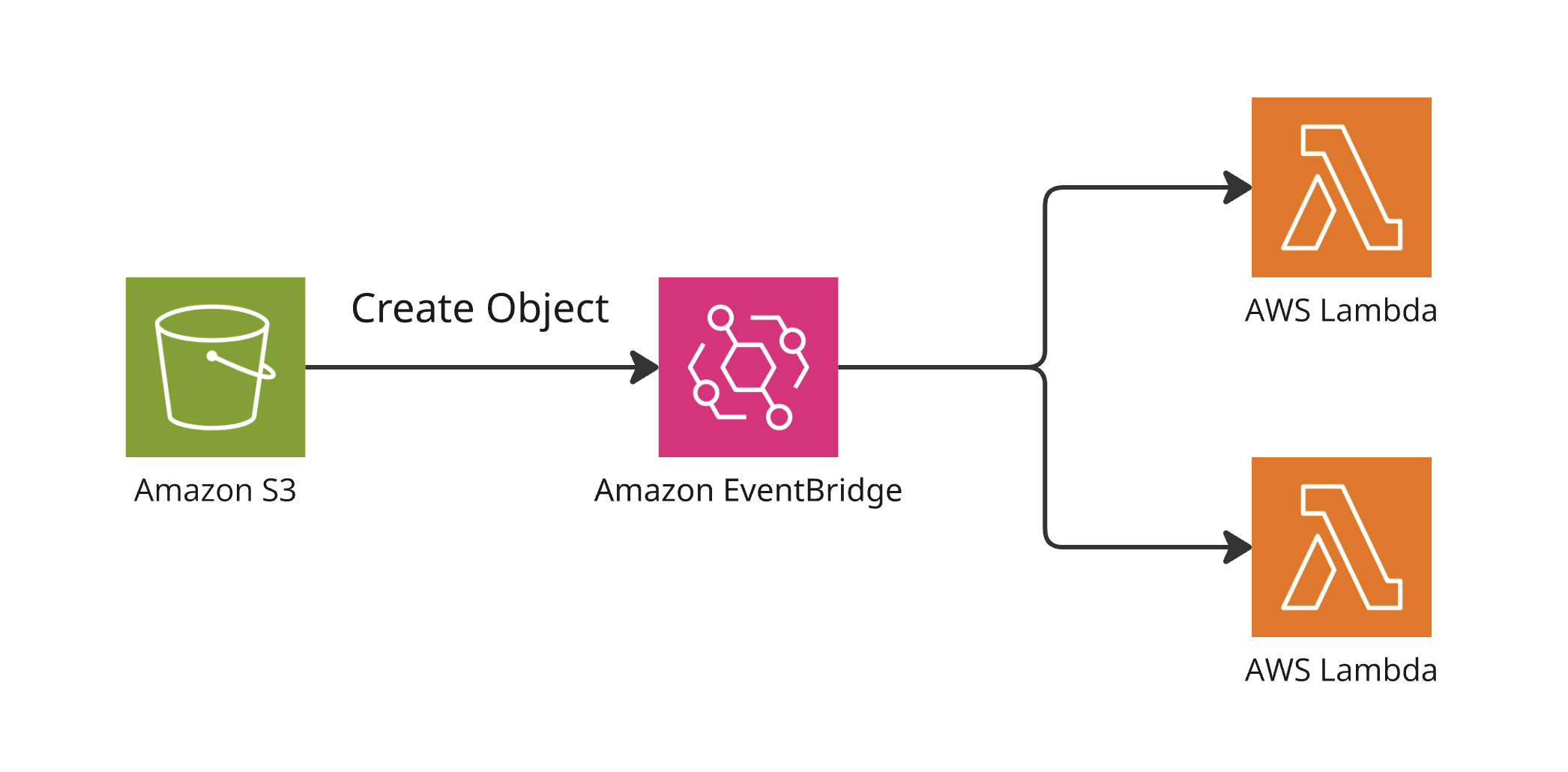
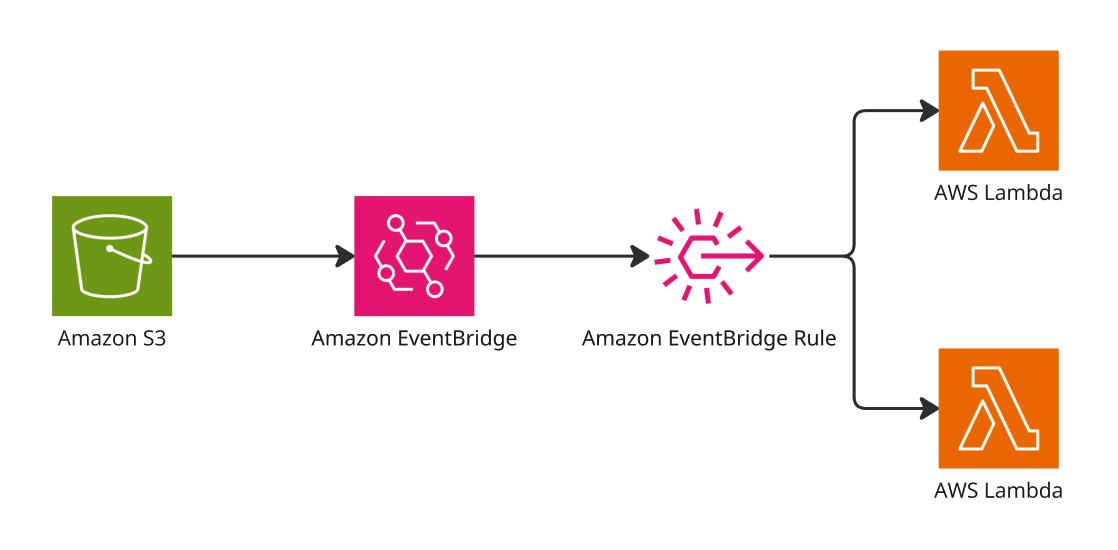
최종적으로 필요한 구조는 다음과 같다.
- S3 스토리지에 PDF 파일을 업로드한다.
- PDF 파일이 업로드되는 경우 지정된 타겟 람다 애플리케이션으로 이벤트를 전달한다.
2. Template for AWS SAM CLI
IaC(infrastructure as code)로 AWS SAM(Serverless Application Model)를 사용했다. 위에서 언급한 구조를 만들기 위한 예제 코드를 살펴보자. 간소화된 프로젝트 구조는 다음과 같다. target-1, target-2 디렉토리에는 람다 핸들러가 포함된다.
$ tree -I ".aws-sam|.idea|.venv|venv" .

.
├── __init__.py
├── samconfig.toml
├── target-1
│   ├── __init__.py
│   └── handler.py
├── target-2
│   ├── __init__.py
│   └── handler.py
└── template.yaml
파이썬 코드에선 간단한 로그를 출력하고, 어떤 핸들러에서 어떤 요청을 처리했는지에 대한 내용이 담긴 메시지를 반환한다.
import json


def lambda_handler(event, context):
    print(f"Hello, I am a first target. - {json.dumps(event)}")
    return {
        "statusCode": 200,
        "body"      : f"Hello, I am a first target. - {json.dumps(event)}"
    }
처음 구성한 템플릿은 다음과 같다. 설명은 주석에 포함한다.
AWSTemplateFormatVersion: '2010-09-09'
Transform: AWS::Serverless-2016-10-31
Description: A simple SAM app with Lambda

Globals:
  # 람다 함수 리소스 스펙
  Function:
    Timeout: 5
    MemorySize: 128
    Runtime: python3.13

Resources:
  # AWS S3 버킷
  S3Bucket:
    Type: AWS::S3::Bucket
    Properties:
      BucketName: event-bridge-bucket-name
      # 이벤트 브릿지로 이벤트를 보내기 위한 설정
      NotificationConfiguration:
        EventBridgeConfiguration:
          EventBridgeEnabled: true

  # 첫번째 타겟 람다
  FirstTargetLambda:
    Type: AWS::Serverless::Function
    Properties:
      CodeUri: target-1/
      Handler: handler.lambda_handler
      Events:
        # 이벤트 브릿지 규칙
        UploadEvent:
          Type: EventBridgeRule
          Properties:
            Pattern:
              # 소스 S3
              source:
                - aws.s3
              # 오브젝트 생성 이벤트
              detail-type:
                - "Object Created"
              detail:
                # S3 버킷 레퍼런스
                bucket:
                  name:
                    - !Ref S3Bucket
                # 접미사가 .pdf 파일만 대상으로 필터링
                object:
                  key:
                    - suffix: ".pdf"
          EventBusName: default

  # 두번째 타겟 람다
  SecondTargetLambda:
    Type: AWS::Serverless::Function
    Properties:
      CodeUri: target-2/
      Handler: handler.lambda_handler
      Events:
        UploadEvent:
          Type: EventBridgeRule
          Properties:
            Pattern:
              source:
                - aws.s3
              detail-type:
                - "Object Created"
              detail:
                bucket:
                  name:
                    - !Ref S3Bucket
                object:
                  key:
                    - suffix: ".pdf"
          EventBusName: default
위 템플릿을 빌드한다.
$ sam build

Starting Build use cache
Building codeuri: /Users/junhyunny/Desktop/action-in-blog/target-1 runtime: python3.13 architecture: x86_64 functions: FirstTargetLambda
Building codeuri: /Users/junhyunny/Desktop/action-in-blog/target-2 runtime: python3.13 architecture: x86_64 functions: SecondTargetLambda
requirements.txt file not found. Continuing the build without dependencies.
requirements.txt file not found. Continuing the build without dependencies.
 Running PythonPipBuilder:CopySource
 Running PythonPipBuilder:CopySource

Build Succeeded

Built Artifacts  : .aws-sam/build
Built Template   : .aws-sam/build/template.yaml

Commands you can use next
=========================
[*] Validate SAM template: sam validate
[*] Invoke Function: sam local invoke
[*] Test Function in the Cloud: sam sync --stack-name {{stack-name}} --watch
[*] Deploy: sam deploy --guided
빌드가 완료되면 이를 배포한다. 다음과 같이 각 타겟 람다에 대한 Permission, Rule 리소스가 생성된다.
$ sam deploy

...

CloudFormation stack changeset
-------------------------------------------------------------------------------------------------------------------------------------------------------------------------------------------------
Operation                                        LogicalResourceId                                ResourceType                                     Replacement
-------------------------------------------------------------------------------------------------------------------------------------------------------------------------------------------------
+ Add                                            FirstTargetLambdaRole                            AWS::IAM::Role                                   N/A
+ Add                                            FirstTargetLambdaUploadEventPermission           AWS::Lambda::Permission                          N/A
+ Add                                            FirstTargetLambdaUploadEvent                     AWS::Events::Rule                                N/A
+ Add                                            FirstTargetLambda                                AWS::Lambda::Function                            N/A
+ Add                                            S3Bucket                                         AWS::S3::Bucket                                  N/A
+ Add                                            SecondTargetLambdaRole                           AWS::IAM::Role                                   N/A
+ Add                                            SecondTargetLambdaUploadEventPermission          AWS::Lambda::Permission                          N/A
+ Add                                            SecondTargetLambdaUploadEvent                    AWS::Events::Rule                                N/A
+ Add                                            SecondTargetLambda                               AWS::Lambda::Function                            N/A
-------------------------------------------------------------------------------------------------------------------------------------------------------------------------------------------------

...

Previewing CloudFormation changeset before deployment
======================================================
Deploy this changeset? [y/N]: y

2025-05-25 00:56:23 - Waiting for stack create/update to complete

CloudFormation events from stack operations (refresh every 5.0 seconds)
-------------------------------------------------------------------------------------------------------------------------------------------------------------------------------------------------
ResourceStatus                                   ResourceType                                     LogicalResourceId                                ResourceStatusReason
-------------------------------------------------------------------------------------------------------------------------------------------------------------------------------------------------
CREATE_IN_PROGRESS                               AWS::CloudFormation::Stack                       sam-app                                          User Initiated

...

CREATE_COMPLETE                                  AWS::CloudFormation::Stack                       sam-app                                          -
-------------------------------------------------------------------------------------------------------------------------------------------------------------------------------------------------

Successfully created/updated stack - sam-app in ap-northeast-1
배포가 완료된 후 이벤트 브릿지를 보면 두 개의 규칙이 생성된 것을 확인할 수 있다.
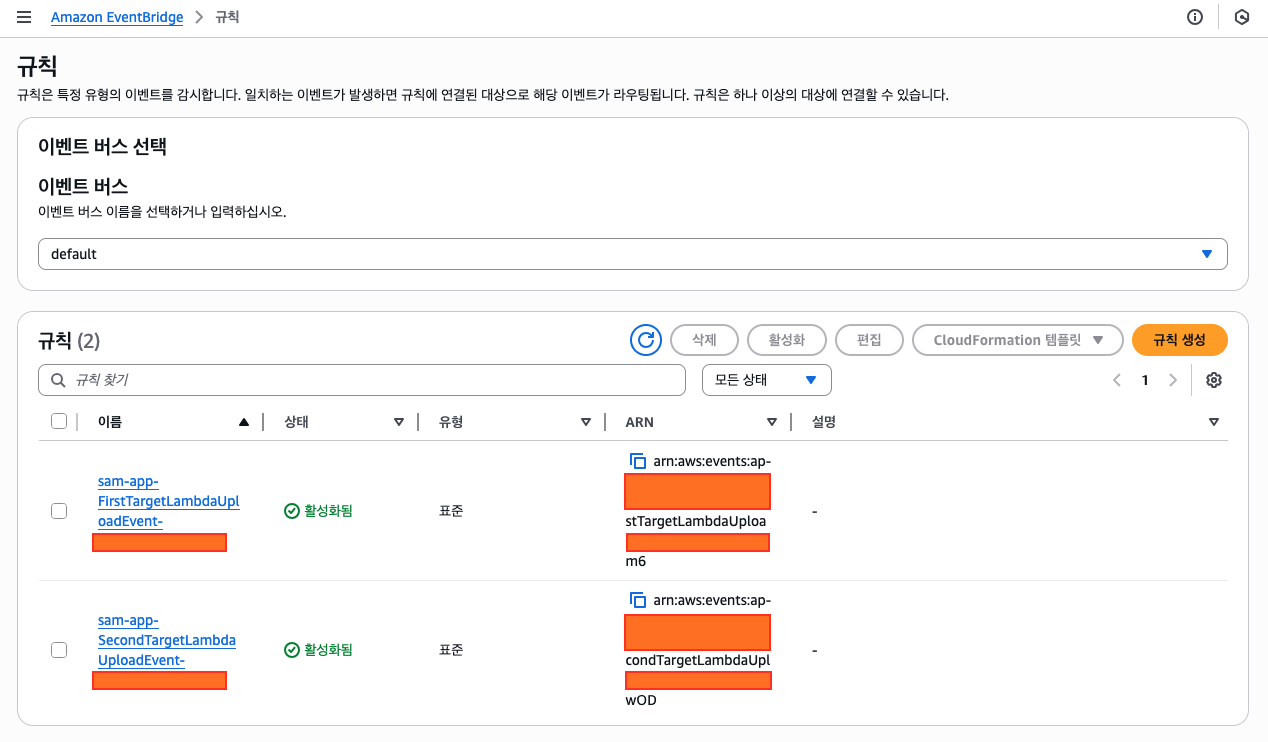
람다 리소스 하위 이벤트에 직접 규칙을 설정하면 각 람다에 대한 허가(permission)와 규칙(rule)이 별도로 생성된다.
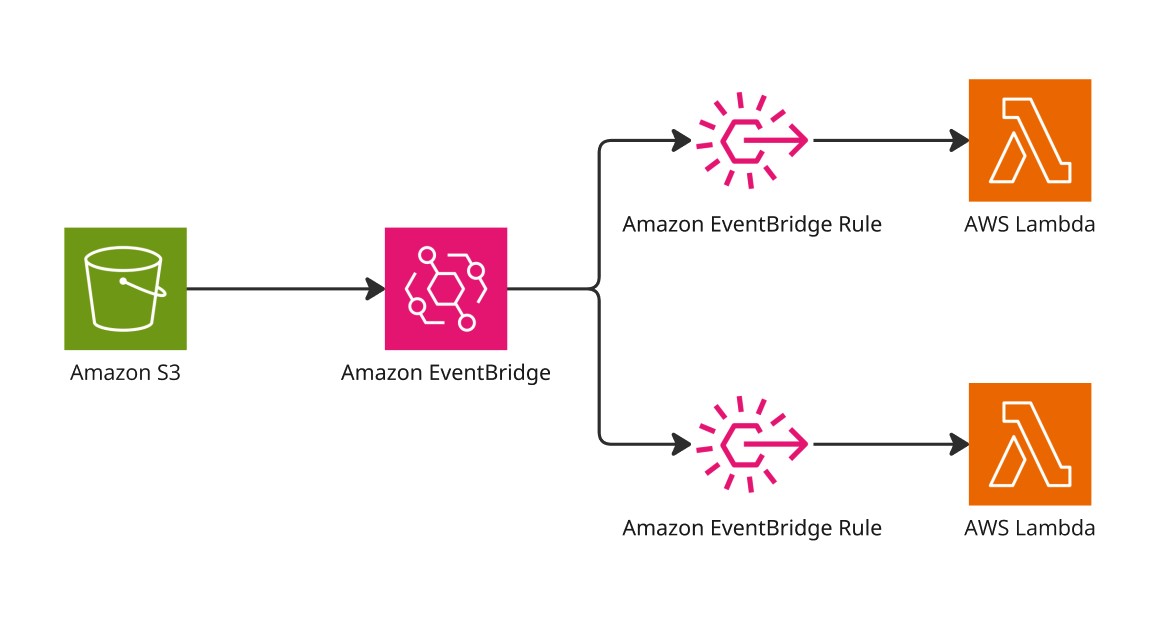
두 람다에 대해 동일한 규칙을 지정하려면 다음과 같이 템플릿을 변경한다. 아래 템플릿을 배포하면 하나의 이벤트 브릿지 규칙과 각 람다를 수행하기 위한 두 개의 권한이 생성된다.
AWSTemplateFormatVersion: '2010-09-09'
Transform: AWS::Serverless-2016-10-31
Description: A simple SAM app with Lambda

Globals:
  # 람다 함수 리소스 스펙
  Function:
    Timeout: 5
    MemorySize: 128
    Runtime: python3.13

Resources:
  # AWS S3 버킷
  S3Bucket:
    Type: AWS::S3::Bucket
    Properties:
      BucketName: event-bridge-bucket-name
      # 이벤트 브릿지로 이벤트를 보내기 위한 설정
      NotificationConfiguration:
        EventBridgeConfiguration:
          EventBridgeEnabled: true

  # EventBridge 규칙
  UnifiedS3EventRule:
    Type: AWS::Events::Rule
    Properties:
      Name: "lambda-file-upload-event"
      # 이벤트 패턴
      EventPattern:
        source:
          - aws.s3
        detail-type:
          - "Object Created"
        detail:
          bucket:
            name:
              - !Ref S3Bucket
          object:
            key:
              - suffix: ".pdf"
      # 이벤트 규칙 타겟 지정
      Targets:
        - Id: !Ref FirstTargetLambda
          Arn: !GetAtt FirstTargetLambda.Arn
        - Id: !Ref SecondTargetLambda
          Arn: !GetAtt SecondTargetLambda.Arn

  # 첫번째 타겟 람다 실행을 위한 permission
  PermissionForEventsToInvokeLambda:
    Type: AWS::Lambda::Permission
    Properties:
      FunctionName: !Ref FirstTargetLambda
      Action: lambda:InvokeFunction
      Principal: events.amazonaws.com
      SourceArn: !GetAtt UnifiedS3EventRule.Arn

  # 두번째 타겟 람다 실행을 위한 permission
  PermissionForSeccondEventsToInvokeLambda:
    Type: AWS::Lambda::Permission
    Properties:
      FunctionName: !Ref SecondTargetLambda
      Action: lambda:InvokeFunction
      Principal: events.amazonaws.com
      SourceArn: !GetAtt UnifiedS3EventRule.Arn

  # 첫번째 타겟 람다
  FirstTargetLambda:
    Type: AWS::Serverless::Function
    Properties:
      CodeUri: target-1/
      Handler: handler.lambda_handler

  # 두번째 타겟 람다
  SecondTargetLambda:
    Type: AWS::Serverless::Function
    Properties:
      CodeUri: target-2/
      Handler: handler.lambda_handler
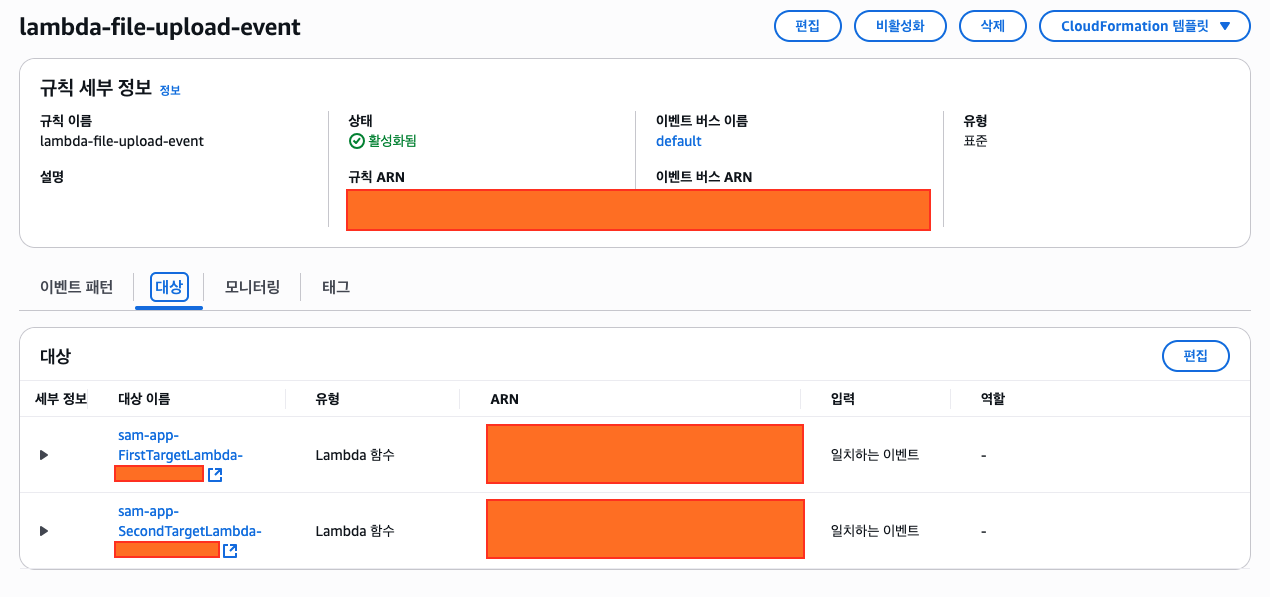
위 템플릿을 배포하면 다음과 같은 규칙 정보를 확인할 수 있다.
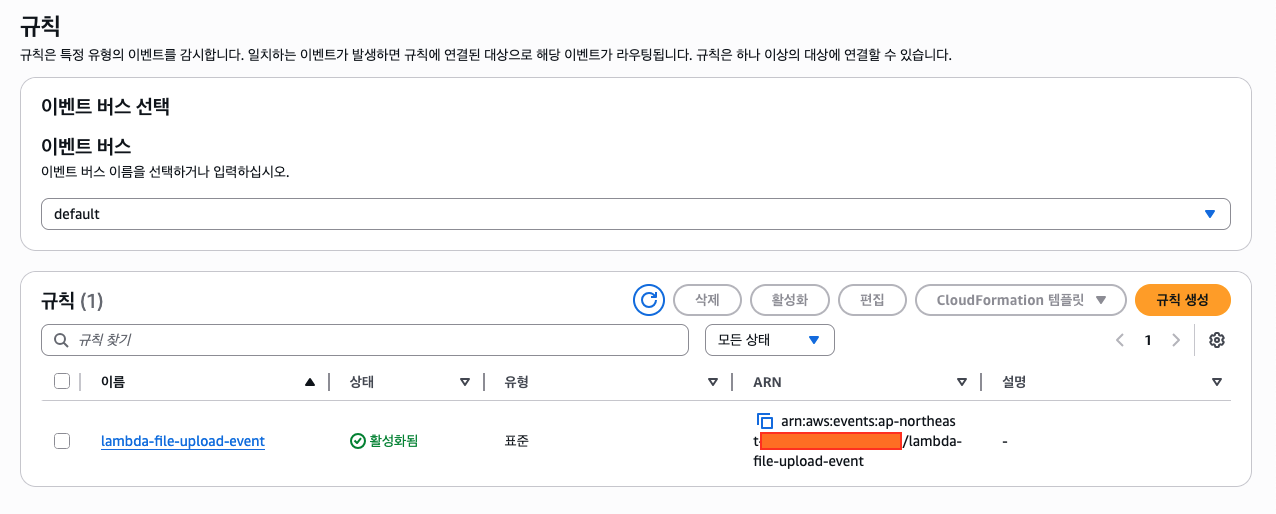
해당 규칙의 대상(target)을 보면 두 개의 람다가 연결된 것을 볼 수 있다.
최종적으로 시스템은 다음과 같이 결합된다.
CLOSING
S3에 확장자가 .pdf인 파일을 업로드하면 각 람다 함수가 트리거(trigger)되지만, 이 외에 파일 업로드에는 반응하지 않는다. AWS 클라우드워치(CloudWatch)에서 로그를 확인하면 두 타겟 람다에 이벤트가 모두 전달된 것을 확인할 수 있다.
TEST CODE REPOSITORY
REFERENCE
KEEP READING
함께 읽으면 좋은 글
DISCUSSION