


FAISS 인덱싱과 검색
RECOMMEND POSTS BEFORE THIS
0. 들어가면서
스탠포드 STORM 프레임워크에서 검색 모듈을 확장할 때 FAISS 벡터 데이터베이스를 사용했다. FAISS(Facebook AI Similarity Search)는 이름에서 알 수 있듯이, Meta(구 Facebook)의 AI 연구팀이 개발하여 오픈 소스로 공개한 밀집 벡터(dense vectors)의 효율적인 유사도 검색과 클러스터링을 위한 검색 라이브러리다.
이번 글은 FAISS 벡터 데이터베이스를 사용해 인덱싱과 검색을 하는 방법을 정리했다. 유사도 검색을 위한 벡터 데이터베이스 관련 내용은 이 글을 참조하길 바란다.
1. Prepare fake data
FAISS 인덱싱을 수행하기 전에 필요한 라이브러리들을 설치한다. 벡터 데이터베이스 faiss-cpu, 텍스트 임베딩(embedding)을 위한 sentence-transformers, 테스트 데이터를 만들기 위한 faker를 설치한다.
$ pip install faiss-cpu faker sentence-transformers
인덱싱과 검색을 수행하기 전 가짜 데이터를 만든다. 아래 스크립트를 실행하면 임의의 가짜 데이터가 생성되고, 프로젝트 db 경로에 JSON 파일이 생성된다.
import json
import os
from dataclasses import asdict
from typing import List

from faker import Faker

from article import Article

fake = Faker("en_US")


def fake_articles(num_records=5) -> List[Article]:
  data: List[Article] = []
  for i in range(1, num_records + 1):
    id = i
    content = " ".join(fake.paragraphs(nb=1))
    data.append(Article(id, content.strip()))
  return data


if __name__ == "__main__":
  articles = fake_articles()
  dict_list = [asdict(article) for article in articles]
  os.makedirs(os.path.dirname("db/"), exist_ok=True)
  json.dump(dict_list, fp=open("db/articles.json", "w"))
이번 글에서 인덱싱과 조회에 사용할 데이터는 아래와 같다.
[
  {
    "id": 1,
    "content": "Themselves financial wide result direction whether value. Decade wish eight either money."
  },
  {
    "id": 2,
    "content": "Use summer find indeed if necessary. Represent leader mind program increase cost. Choice apply finally plant task."
  },
  {
    "id": 3,
    "content": "Image through add total discover head resource. Person land method brother during involve wear. Young effect international."
  },
  {
    "id": 4,
    "content": "Politics listen beat pressure little mother. Recently face product move recognize free what."
  },
  {
    "id": 5,
    "content": "Camera news industry remain on second. Matter decision play top force down economic. Visit long movie writer without."
  }
]
2. FAISS indexing and search
FAISS의 설계 목적은 “수억 개의 숫자 뭉치 중에서 가장 비슷한 숫자를 빠르게 찾는 것”이다. FAISS는 각 데이터 인스턴스가 벡터로 표현되고 정수 ID로 식별된다고 가정하며, 벡터 간의 비교는 L2(유클리드) 거리 또는 내적(Dot product)을 통해 이루어진다. 쿼리 벡터와 유사한 벡터란 쿼리 벡터와의 L2 거리가 가장 낮거나 내적 값이 가장 높은 벡터를 의미한다. 정규화된 벡터에 대한 내적은 코사인 유사도와 같으므로 이를 지원한다.
FAISS는 용량이 큰 텍스트(String)를 같이 저장하면 메모리 효율이 떨어지고 속도가 느려지기 때문에, 벡터 연산에만 집중한다. 그렇기에 저장소에 벡터 배열만 저장하고, 조회할 때 원본 문장을 획득할 수 없다. FAISS 인덱스 객체를 통해 조회하면 두 개의 결과를 얻는다.
- 거리(D, Distances): 유사도 점수
- 색인(I, Indices): 찾은 벡터의 ID
RAG에서 필요한 데이터는 조회하는 쿼리와 의미론적으로 유사한 원본 텍스트이기 때문에 두 단계에 걸쳐서 원본 데이터를 조회한다.
- 검색(search): 질문을 FAISS에게 던져서 색인(ID)을 얻는다.
- 조회(lookup): 색인(ID)을 가지고 별도로 구성해 둔 DB나 리스트에서 실제 데이터를 꺼낸다.
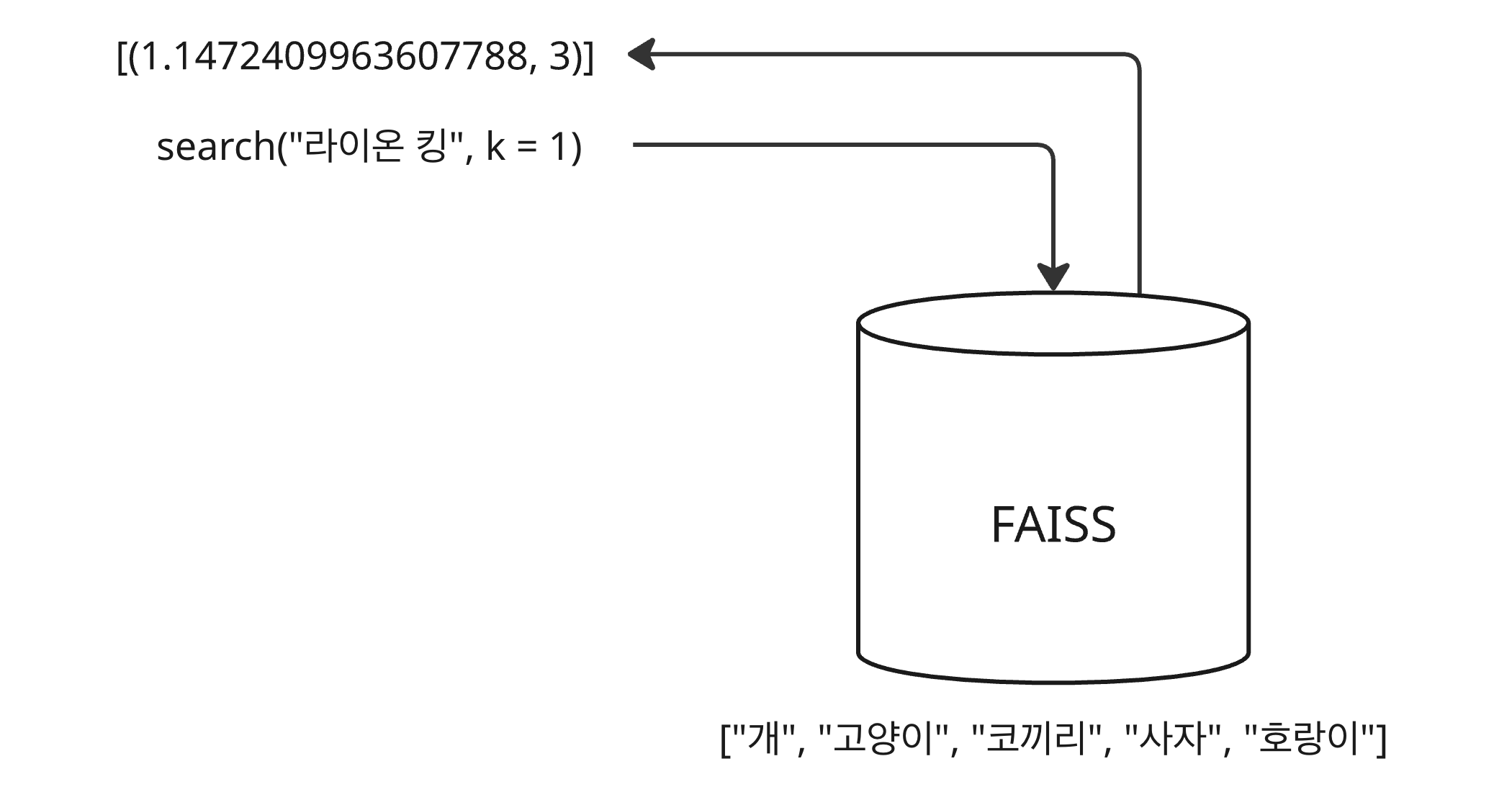
조회(lookup) 과정에서 색인(ID)이 필요한데, 데이터를 벡터 데이터베이스에 인덱싱하는 방법에 따라 색인 값이 다르다. 예를 들어, ID 매핑 없이 단순히 인덱싱한다면, 검색할 때 조회되는 색인(indices)은 인덱싱한 벡터 배열의 위치 인덱스다.
- FAISS 벡터 데이터베이스에 [“개”, “고양이”, “코끼리”, “사자”, “호랑이”]에 대한 벡터들이 저장되어 있다.
- “라이온 킹”이라는 검색어 벡터로 조회하면 가장 유사한 의미를 갖는 “사자” 벡터와의 거리와 “사자” 벡터의
인덱스 3이 반환된다.
벡터 데이터베이스로부터 찾은 인덱스를 갖고 원본 데이터를 찾아야 한다. 이전 글에선 피클(pickle) 파일을 만들어 활용했다. 아래 예제 코드는 ID 매핑 없이 인덱싱한 예제 코드다. 오픈 소스인 SentenceTransformer 객체를 임베딩 모델로 사용했다.
- IndexFlatL2 메서드를 통해 index 객체를 생성한다.
- 래핑 객체의 add 메서드를 통해 벡터 배열을 인덱싱한다.
- 반환된 색인은 검색된 벡터의 위치 인덱스이므로 이를 통해 원본 데이터의 아이디와 컨텐츠를 조회한다.
import json
from typing import List

import faiss
import numpy as np
from sentence_transformers import SentenceTransformer

from models.article import Article

model = SentenceTransformer(
  "sentence-transformers/paraphrase-multilingual-mpnet-base-v2"
)


def embedding_articles(
  contents: List[str],
) -> tuple[np.ndarray, int]:
  embeddings = model.encode(contents, normalize_embeddings=True, show_progress_bar=True)
  embeddings = embeddings.astype("float32")
  dimension = embeddings.shape[1]
  return embeddings, dimension


def embedding_query(query: str):
  return model.encode([query], normalize_embeddings=True)


def fetch_articles():
  articles_json = json.loads(open("db/articles.json", "r").read())
  return [Article(item) for item in articles_json]


def indexing_without_id_mapping():
  articles = fetch_articles()

  ids = list(article.id for article in articles)
  contents = list([article.content for article in articles])

  embeddings, dimension = embedding_articles(contents)
  index = faiss.IndexFlatL2(dimension)
  index.add(embeddings)

  query_vector = embedding_query("mindset consulting")
  distances, indices = index.search(query_vector, 5)

  for distance, contents_index in zip(distances[0], indices[0]):
    print(f"distance: {distance}, contents_index: {contents_index}")
    print(f"article's id: {ids[contents_index]}")
    print(f"content: {contents[contents_index]}")
위 코드를 실행하면 다음과 같은 로그를 얻을 수 있다.
- “mindset consulting” 쿼리 벡터와 가장 유사한 의미를 갖는 벡터의 위치는 1이다.
- 해당 위치의 아티클 아이디는 2, 컨텐츠는 “Use summer find indeed if necessary. Represent leader mind program increase cost. Choice apply finally plant task.”이다.
distance: 1.1472409963607788, contents_index: 1
article's id: 2
content: Use summer find indeed if necessary. Represent leader mind program increase cost. Choice apply finally plant task.
distance: 1.3449867963790894, contents_index: 3
article's id: 4
content: Politics listen beat pressure little mother. Recently face product move recognize free what.
distance: 1.4448405504226685, contents_index: 2
article's id: 3
content: Image through add total discover head resource. Person land method brother during involve wear. Young effect international.
distance: 1.5763461589813232, contents_index: 0
article's id: 1
content: Themselves financial wide result direction whether value. Decade wish eight either money.
distance: 1.7152055501937866, contents_index: 4
article's id: 5
content: Camera news industry remain on second. Matter decision play top force down economic. Visit long movie writer without.
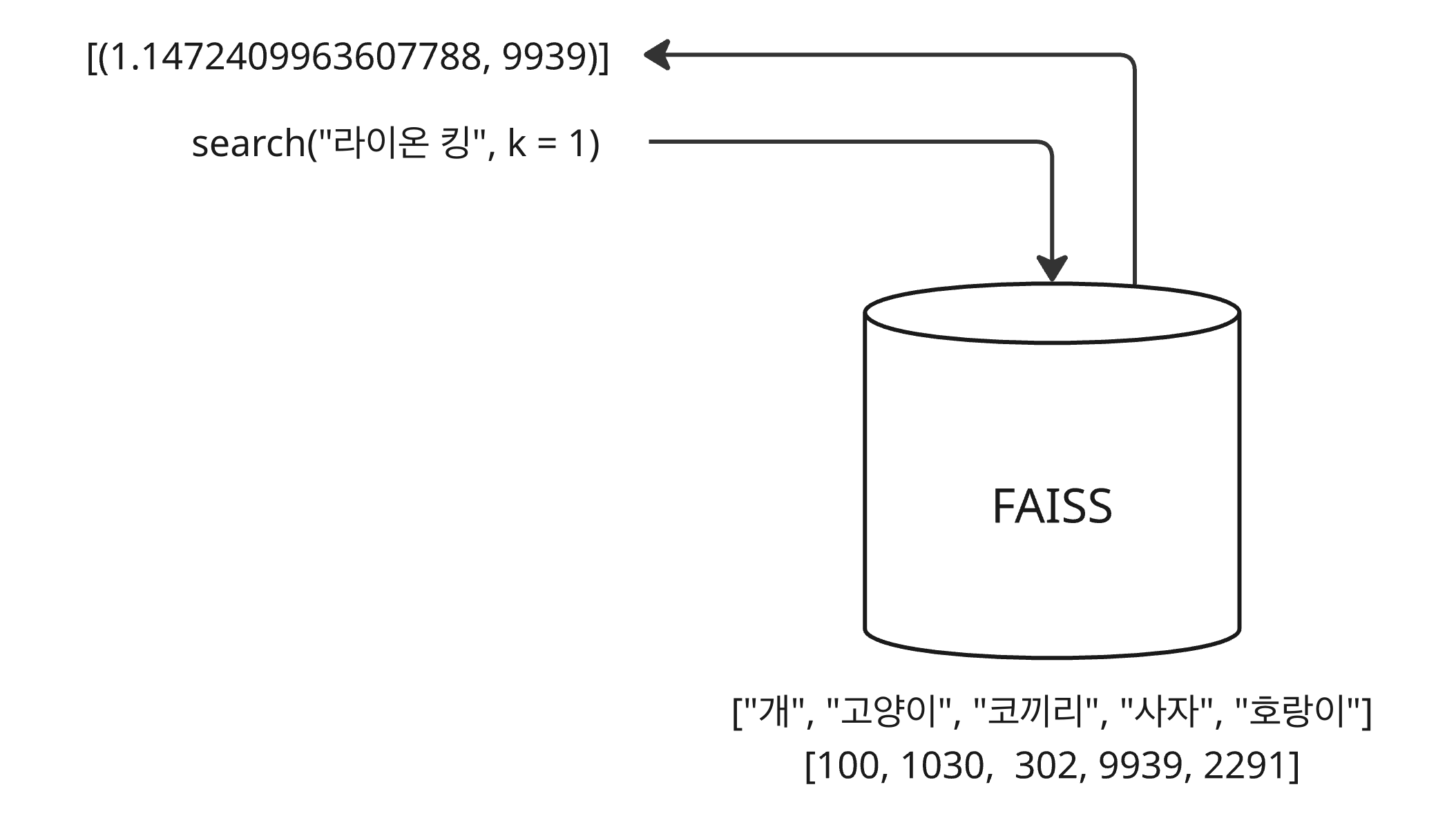
FAISS를 사용할 때 인덱싱 시점의 벡터의 위치를 얻어 매번 원본 데이터를 찾아야 한다면 피클 파일을 만드는 것 같은 번거로운 작업이 필요하다. 이런 불편함을 덜기 위해 인덱싱할 때 실제 ID 배열을 전달하여 함께 매핑할 수 있다. 조회할 때 반환되는 색인은 해당 벡터의 위치 인덱스가 아닌 실제 아이디가 반환된다.
- FAISS 벡터 데이터베이스에 [“개”, “고양이”, “코끼리”, “사자”, “호랑이”]에 대한 벡터들이 저장되어 있다.
- 저장된 벡터 배열과 매핑되는 아이디 배열 [100, 1030, 302, 9939, 2291]도 함께 저장되어 있다.
- “라이온 킹”이라는 검색어 벡터로 조회하면 가장 유사한 의미를 갖는 “사자” 벡터와의 거리와 “사자” 벡터의
아이디 9939이 반환된다.
단, FAISS 인덱스 객체를 생성하고 IndexIDMap 메서드를 통해 ID 매핑이 가능한 객체로 래핑(wrapping) 후 사용한다. 예제 코드는 다음과 같다.
- IndexFlatL2 메서드를 통해 index 객체를 생성한다.
- IndexIDMap 메서드를 통해 index 객체를 래핑한 id_map_index 객체를 생성한다.
- id_map_index 래핑 객체의 add_with_ids 메서드를 통해 벡터 배열을 인덱싱한다. 이때, 아이디 배열도 함께 전달한다.
- 반환된 색인이 아이디이므로 이를 그대로 사용할 수 있다.
def indexing_with_id_mapping():
  articles = fetch_articles()

  ids = np.array(list(article.id for article in articles))
  contents = list([article.content for article in articles])
  dict_db = dict(zip(ids, contents))

  embeddings, dimension = embedding_articles(contents)
  index = faiss.IndexFlatL2(dimension)
  id_map_index = faiss.IndexIDMap(index)
  id_map_index.add_with_ids(embeddings, ids)

  query_vector = embedding_query("mindset consulting")
  distances, indices = id_map_index.search(query_vector, 5)

  for distance, article_id in zip(distances[0], indices[0]):
    print(f"distance: {distance}")
    print(f"article's id: {article_id}")
    print(f"content: {dict_db[article_id]}")
위 코드를 실행하면 다음과 같은 로그를 얻을 수 있다.
- “mindset consulting” 쿼리 벡터와 가장 유사한 의미를 갖는 벡터의 아이디는 2이다.
- 벡터의 아이디를 통해 데이터베이스로부터 컨텐츠를 찾을 수 있다. 컨텐츠는 위와 동일하게 “Use summer find indeed if necessary. Represent leader mind program increase cost. Choice apply finally plant task.”이다.
distance: 1.1472409963607788
article's id: 2
content: Use summer find indeed if necessary. Represent leader mind program increase cost. Choice apply finally plant task.
distance: 1.3449867963790894
article's id: 4
content: Politics listen beat pressure little mother. Recently face product move recognize free what.
distance: 1.4448405504226685
article's id: 3
content: Image through add total discover head resource. Person land method brother during involve wear. Young effect international.
distance: 1.5763461589813232
article's id: 1
content: Themselves financial wide result direction whether value. Decade wish eight either money.
distance: 1.7152055501937866
article's id: 5
content: Camera news industry remain on second. Matter decision play top force down economic. Visit long movie writer without.
댓글남기기